在给 https://github.com/MystenLabs/sui/pull/21691#issuecomment-2775279609 时,需要执行两个命令,
第一个在执行过程中报错:
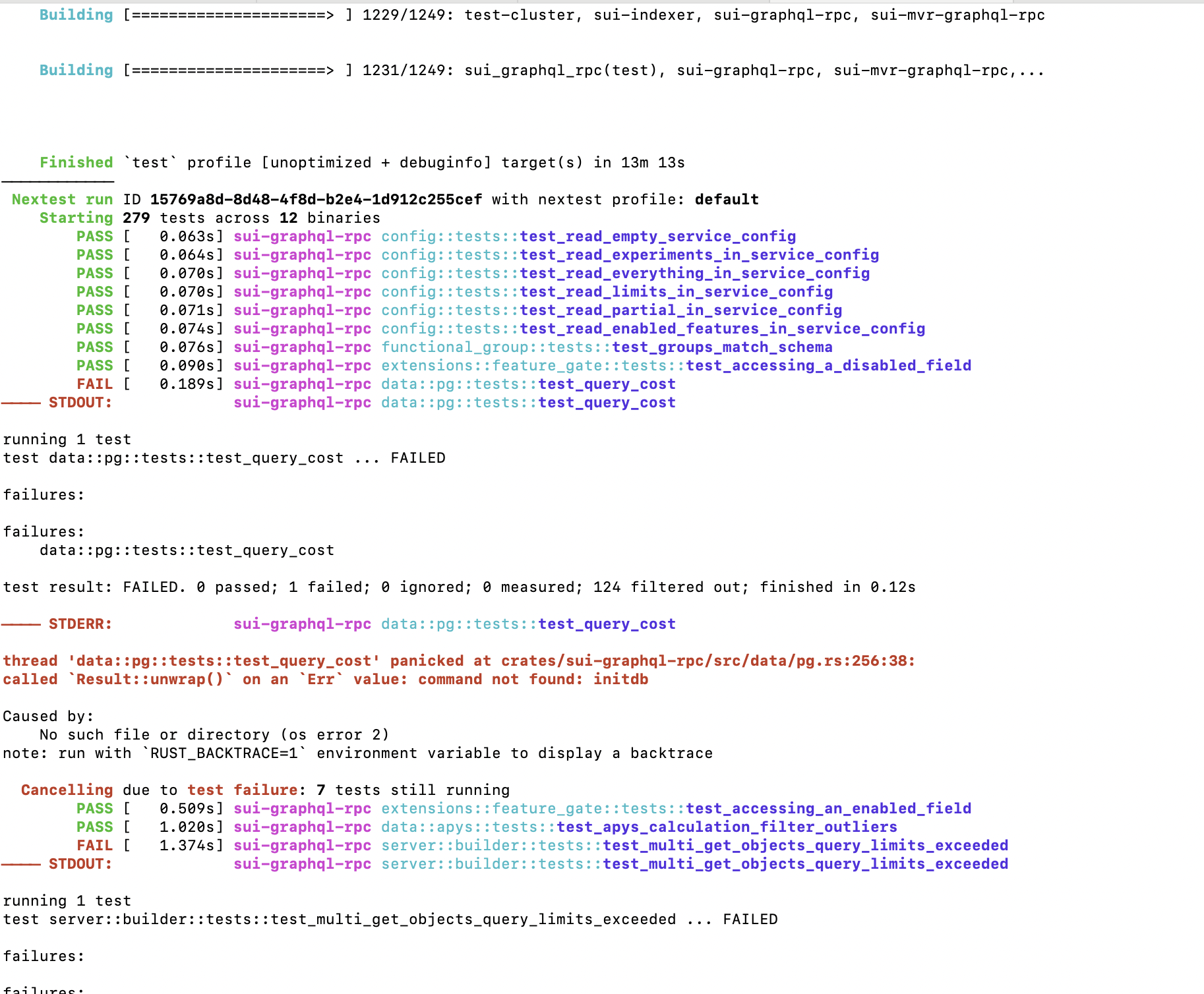
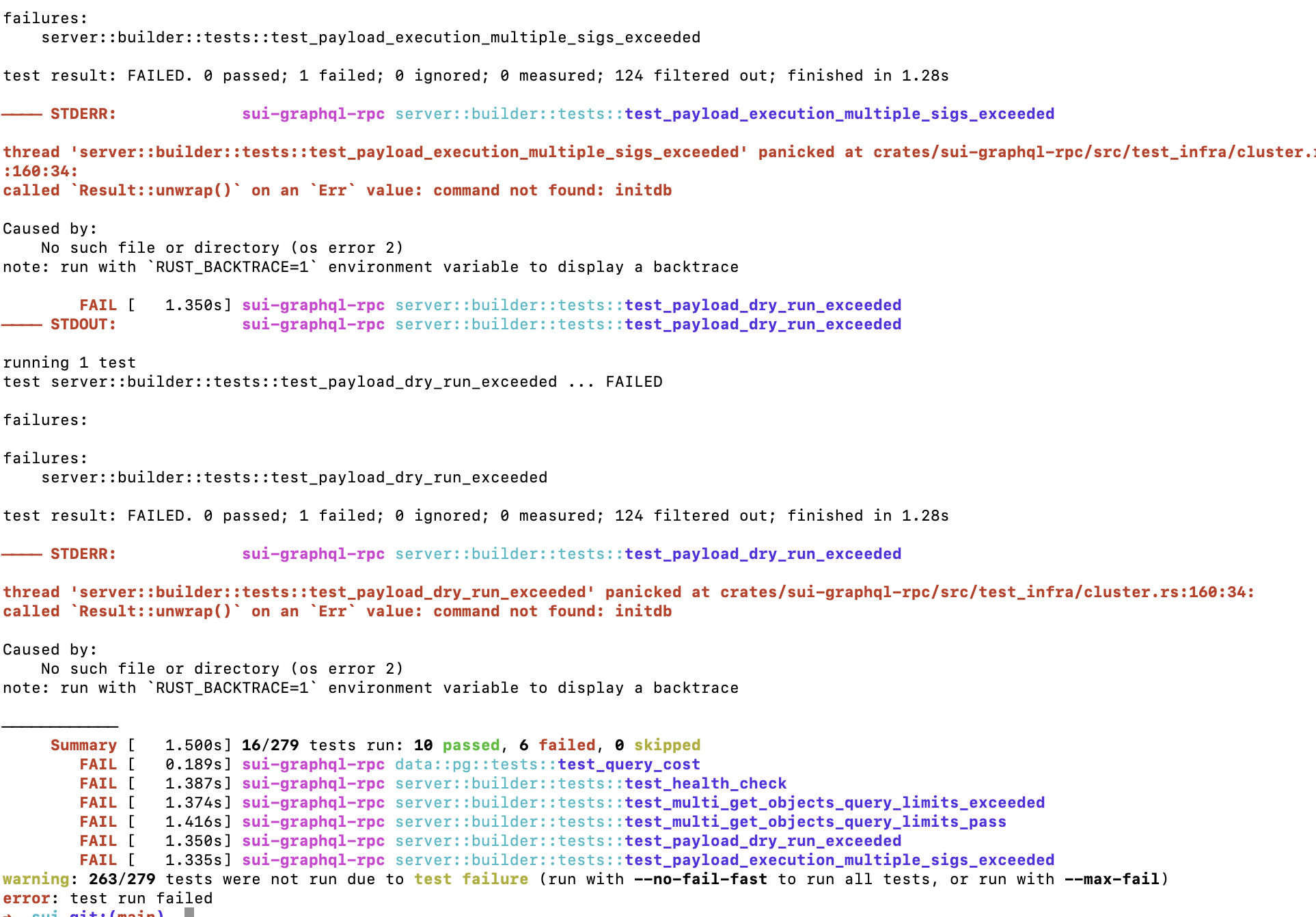
initdb是什么工具?
initdb 是一个 PostgreSQL 数据库管理系统中用于初始化数据库集群的工具。它创建一个新的数据库集群并设置系统目录,以便你可以开始使用数据库。具体来说,initdb 执行以下操作:
- 创建一个新的数据库目录,通常包含 PostgreSQL 的系统表和配置文件。
- 设置数据库系统所需的系统表和目录结构。
- 创建初始用户角色(如超级用户
postgres)。 - 根据需要创建默认的配置文件。
用户通常在安装 PostgreSQL 后使用 initdb 来创建新的数据库集群,以便随后进行数据库的创建和管理。使用该工具,用户需要指定一些参数,比如数据存储的路径、字符集等。
这个错误信息:
1 | called `Result::unwrap()` on an `Err` value: command not found: initdb |
说明你的程序在运行时尝试执行一个外部命令 initdb,但系统找不到这个命令,导致返回了一个错误(Err),并且程序调用了 .unwrap(),试图直接取出结果,因此触发了 panic。
具体原因可能是:
系统没有安装 PostgreSQL
initdb是 PostgreSQL 的一个命令行工具,用于初始化数据库集群。如果你没有安装 PostgreSQL,那么自然找不到这个命令。环境变量 PATH 中没有包含 initdb 所在的目录
即使你安装了 PostgreSQL,如果initdb的路径没有加入到系统的环境变量PATH中,也会导致“找不到命令”。在非类 Unix 平台上未正确配置 PostgreSQL 工具链
比如在 Windows 上运行时没有正确配置 PostgreSQL 的安装路径。
解决方法:
✅ 方法一:安装 PostgreSQL
如果你没有安装 PostgreSQL,可以在终端中执行:
1 | # Ubuntu / Debian |
✅ 方法二:确认 initdb 是否在 PATH 中
你可以在终端执行以下命令来检查 initdb 是否可用:
1 | which initdb |
如果没有输出,说明系统无法找到 initdb。
你可以手动查找 PostgreSQL 的安装路径,例如:
1 | ls /usr/lib/postgresql/*/bin/initdb |
然后将其添加到 PATH 中,例如:
1 | export PATH="/usr/lib/postgresql/14/bin:$PATH" |
可将这行加入到 ~/.bashrc 或 ~/.zshrc 中以永久生效。
✅ 方法三:避免直接使用 .unwrap()
从 Rust 的角度来说,直接 unwrap() 会在错误发生时 panic。更好的方式是处理错误,例如:
1 | let output = Command::new("initdb").output(); |
如果你告诉我你用的是什么操作系统,我可以给你更具体的安装或配置方法。
谢谢你提供的信息!你在 macOS 上遇到的错误:
1 | called `Result::unwrap()` on an `Err` value: command not found: initdb |
说明 PostgreSQL 没有安装,或者 initdb 命令没有加入环境变量 PATH 中。
✅ 解决方法(macOS)
1. 安装 PostgreSQL(推荐使用 Homebrew)
在终端中运行以下命令来安装:
1 | brew install postgresql |
安装完成后,Homebrew 会提示你一些使用信息,比如:
1 | To have launchd start postgresql now and restart at login: |
你可以使用它来启动 PostgreSQL 服务。
2. 检查 initdb 是否可用
安装成功后,运行:
1 | which initdb |
正常情况下应该输出类似路径:
1 | /opt/homebrew/bin/initdb |
如果有输出,就说明命令已经可用。
3. 初始化数据库(选做)
如果你需要手动初始化数据库目录,可以运行(假设你想把数据库放在 ~/my_pgdata):
1 | initdb ~/my_pgdata |
4. 启动 PostgreSQL 服务(可选)
1 | brew services start postgresql |
或者临时启动:
1 | pg_ctl -D ~/my_pgdata start |
🧠 附加建议(Rust 开发者)
如果你在 Rust 项目中看到这个错误,是因为调用了:
1 | Command::new("initdb").output().unwrap(); |
建议你改成更安全的写法:
1 | use std::process::Command; |
如你需要,我也可以帮你写一个 Rust 脚本用于安装或检测 PostgreSQL 状态。欢迎继续提问!
但是用brew安装时会报错:
brew install postgresql
Warning: You are using macOS 15.
We do not provide support for this pre-release version.
It is expected behaviour that some formulae will fail to build in this pre-release version.
It is expected behaviour that Homebrew will be buggy and slow.
Do not create any issues about this on Homebrew’s GitHub repositories.
Do not create any issues even if you think this message is unrelated.
Any opened issues will be immediately closed without response.
Do not ask for help from Homebrew or its maintainers on social media.
You may ask for help in Homebrew’s discussions but are unlikely to receive a response.
Try to figure out the problem yourself and submit a fix as a pull request.
We will review it but may or may not accept it.
Error: unknown or unsupported macOS version: :dunno
你遇到的这个问题是由于你使用的是 macOS 15 的预发布版本(可能是 macOS Sequoia 或更高),而目前 Homebrew 还没有正式支持该系统版本。
Homebrew 的警告是:
“unknown or unsupported macOS version”
它现在不知道该如何为这个系统构建依赖项(比如 PostgreSQL)。
✅ 解决方案(可行方法)
方法一:使用预构建版本安装 PostgreSQL(推荐)
你可以绕过 Homebrew,直接使用官方提供的安装器:
打开 PostgreSQL 的 macOS 安装页面:https://www.postgresql.org/download/macosx/
点击下载页面中的链接,进入 EnterpriseDB:
https://www.enterprisedb.com/downloads/postgres-postgresql-downloads
选择 macOS 安装包,下载并运行安装器。
它会安装 PostgreSQL、
initdb、psql等工具,并可选择安装 pgAdmin。
方法二:使用 Docker 安装 PostgreSQL(无需依赖系统)
如果你只是为了开发使用 PostgreSQL,可以使用 Docker 运行:
1 | docker run --name my-postgres -e POSTGRES_PASSWORD=123456 -p 5432:5432 -d postgres |
然后你可以通过 psql 或代码连接到 localhost:5432。
📦 你可以用 VSCode 的
Remote - Containers插件,或者直接让你的 Rust 程序连接这个 Docker 容器。
方法三:手动安装 Homebrew 依赖(高级)
⚠️ 如果你非要用 Homebrew,且愿意尝试修复:
- 编辑 Homebrew 的 macOS 版本识别逻辑(不推荐,风险较大)
- 自建 formulae 或使用 tap 安装 PostgreSQL
但不建议在生产环境或主机上这么做,除非你熟悉 Homebrew 的源码。
✅ 建议的做法
| 目标 | 推荐方法 |
|---|---|
| 安装 PostgreSQL 本地开发 | 使用官方安装器(EnterpriseDB) |
| 快速搭建测试环境 | 使用 Docker |
| 等待 Homebrew 支持 | 等 Homebrew 更新支持 macOS 15 |
需要我为你写一份 Docker + Rust 的开发环境示例吗?或者你想用 PostgreSQL 安装器后如何配置 initdb、psql?欢迎告诉我你的具体需求。
https://www.enterprisedb.com/contact
https://www.postgresql.org/download/macosx/
好像不行~
你遇到的错误源于测试代码中调用了 PostgreSQL 的 initdb 命令,而你的系统中没有安装 PostgreSQL(或者没有将其路径添加到环境变量中)。错误信息如下:
1 | called `Result::unwrap()` on an `Err` value: command not found: initdb |
这说明测试代码依赖 initdb 工具(通常用于初始化一个 PostgreSQL 数据目录),而这个命令不可用。
📌 你提出的需求:
不安装 PostgreSQL 的前提下使用
initdb。
虽然 initdb 是 PostgreSQL 工具的一部分,但如果你不想在系统上全局安装 PostgreSQL,有几种替代方案可以让测试通过而不破坏你当前的系统环境。
✅ 解决方案一:使用 Docker 中的 PostgreSQL(推荐)
你可以使用 Docker 启动一个 PostgreSQL 容器,并配置测试代码连接它,而不是调用 initdb。
步骤:
- 启动 PostgreSQL 容器:
1 | docker run --rm -d \ |
- 设置环境变量(如果测试依赖
DATABASE_URL):
1 | export DATABASE_URL=postgres://user:pass@localhost:5432/testdb |
- 运行你的测试:
1 | cargo test |
✅ 这样不需要你安装 PostgreSQL,也不需要
initdb,前提是测试代码支持使用已启动的数据库,而不是自己执行initdb。
✅ 解决方案二:使用 PostgreSQL 的便携版本(Postgres.app)
如果你必须运行依赖 initdb 的测试,但又不想「系统安装」 PostgreSQL,可以使用 Postgres.app:
- 下载 Postgres.app 并运行;
- 添加
initdb命令到PATH环境变量中:
1 | export PATH="/Applications/Postgres.app/Contents/Versions/latest/bin:$PATH" |
- 再次运行测试:
1 | cargo test |
✅ 解决方案三:修改测试,跳过 initdb 调用
如果你有权限修改测试代码,并且 initdb 并非测试的核心,可以临时注释相关测试或使用 #[ignore] 属性跳过它:
1 |
|
然后运行测试:
1 | cargo test -- --ignored |
🔍 补充说明:为什么会调用 initdb
initdb 是 PostgreSQL 的初始化命令,用于创建一个新的数据库集群(数据目录)。有些测试框架或库(如 diesel, sqlx, 或某些集成测试)会尝试在本地启动一个测试数据库。
✅ 结论
| 方法 | 是否推荐 | 是否安装 PostgreSQL | 备注 |
|---|---|---|---|
| Docker 启动 PostgreSQL | ✅ 推荐 | ❌ | 无需 initdb,干净 |
| Postgres.app | ✅ | ❌ | 可便携使用 initdb |
| 修改测试跳过 | ✅ 临时方案 | ❌ | 仅适用于非核心测试 |
| 安装 PostgreSQL | ❌(你不想装) | ✅ | 不符合你的目标 |
如需我协助你为测试代码适配 Docker 中的 PostgreSQL,请贴出相关测试配置或代码片段。
可以在 不安装 PostgreSQL 的前提下使用 initdb。
https://postgresapp.com/downloads.html
下载
然后 export PATH=”/Applications/Postgres.app/Contents/Versions/latest/bin:$PATH”
(这个只在当前命令行窗口有效~)
原文链接: https://dashen.tech/2018/04/10/Mac安装postgresql/
版权声明: 转载请注明出处.