show global status
结果如下:
1
2
3
4
5
6
7
8
9
10
11
12
13
14
15
16
17
18
19
20
21
22
23
24
25
26
27
28
29
30
31
32
33
34
35
36
37
38
39
40
41
42
43
44
45
46
47
48
49
50
51
52
53
54
55
56
57
58
59
60
61
62
63
64
65
66
67
68
69
70
71
72
73
74
75
76
77
78
79
80
81
82
83
84
85
86
87
88
89
90
91
92
93
94
95
96
97
98
99
100
101
102
103
104
105
106
107
108
109
110
111
112
113
114
115
116
117
118
119
120
121
122
123
124
125
126
127
128
129
130
131
132
133
134
135
136
137
138
139
140
141
142
143
144
145
146
147
148
149
150
151
152
153
154
155
156
157
158
159
160
161
162
163
164
165
166
167
168
169
170
171
172
173
174
175
176
177
178
179
180
181
182
183
184
185
186
187
188
189
190
191
192
193
194
195
196
197
198
199
200
201
202
203
204
205
206
207
208
209
210
211
212
213
214
215
216
217
218
219
220
221
222
223
224
225
226
227
228
229
230
231
232
233
234
235
236
237
238
239
240
241
242
243
244
245
246
247
248
249
250
251
252
253
254
255
256
257
258
259
260
261
262
263
264
265
266
267
268
269
270
271
272
273
274
275
276
277
278
279
280
281
282
283
284
285
286
287
288
289
290
291
292
293
294
295
296
297
298
299
300
301
302
303
304
305
306
307
308
309
310
311
312
313
314
315
316
317
318
319
320
321
322
323
324
325
326
327
328
329
330
331
332
333
334
335
336
337
338
339
340
341
342
343
344
345
346
347
348
349
350
351
352
353
354
Aborted_clients 2 Aborted_connects 322 Binlog_cache_disk_use 0 Binlog_cache_use 0 Binlog_stmt_cache_disk_use 0 Binlog_stmt_cache_use 0 Bytes_received 35910 Bytes_sent 381776 Com_admin_commands 4 Com_assign_to_keycache 0 Com_alter_db 0 Com_alter_db_upgrade 0 Com_alter_event 0 Com_alter_function 0 Com_alter_instance 0 Com_alter_procedure 0 Com_alter_server 0 Com_alter_table 0 Com_alter_tablespace 0 Com_alter_user 0 Com_analyze 0 Com_begin 0 Com_binlog 0 Com_call_procedure 0 Com_change_db 27 Com_change_master 0 Com_change_repl_filter 0 Com_check 0 Com_checksum 0 Com_commit 0 Com_create_db 0 Com_create_event 0 Com_create_function 0 Com_create_index 0 Com_create_procedure 0 Com_create_server 0 Com_create_table 0 Com_create_trigger 0 Com_create_udf 0 Com_create_user 0 Com_create_view 0 Com_dealloc_sql 0 Com_delete 0 Com_delete_multi 0 Com_do 0 Com_drop_db 0 Com_drop_event 0 Com_drop_function 0 Com_drop_index 0 Com_drop_procedure 0 Com_drop_server 0 Com_drop_table 0 Com_drop_trigger 0 Com_drop_user 0 Com_drop_view 0 Com_empty_query 0 Com_execute_sql 0 Com_explain_other 0 Com_flush 4 Com_get_diagnostics 0 Com_grant 0 Com_ha_close 0 Com_ha_open 0 Com_ha_read 0 Com_help 0 Com_insert 0 Com_insert_select 0 Com_install_plugin 0 Com_kill 0 Com_load 0 Com_lock_tables 0 Com_optimize 0 Com_preload_keys 0 Com_prepare_sql 0 Com_purge 0 Com_purge_before_date 0 Com_release_savepoint 0 Com_rename_table 0 Com_rename_user 0 Com_repair 0 Com_replace 0 Com_replace_select 0 Com_reset 0 Com_resignal 0 Com_revoke 0 Com_revoke_all 0 Com_rollback 0 Com_rollback_to_savepoint 0 Com_savepoint 0 Com_select 40 Com_set_option 11 Com_signal 0 Com_show_binlog_events 0 Com_show_binlogs 0 Com_show_charsets 0 Com_show_collations 0 Com_show_create_db 0 Com_show_create_event 0 Com_show_create_func 0 Com_show_create_proc 0 Com_show_create_table 0 Com_show_create_trigger 0 Com_show_databases 0 Com_show_engine_logs 0 Com_show_engine_mutex 0 Com_show_engine_status 0 Com_show_events 0 Com_show_errors 0 Com_show_fields 78 Com_show_function_code 0 Com_show_function_status 0 Com_show_grants 0 Com_show_keys 0 Com_show_master_status 0 Com_show_open_tables 0 Com_show_plugins 0 Com_show_privileges 0 Com_show_procedure_code 0 Com_show_procedure_status 0 Com_show_processlist 0 Com_show_profile 0 Com_show_profiles 0 Com_show_relaylog_events 0 Com_show_slave_hosts 0 Com_show_slave_status 0 Com_show_status 3 Com_show_storage_engines 0 Com_show_table_status 4 Com_show_tables 5 Com_show_triggers 0 Com_show_variables 6 Com_show_warnings 0 Com_show_create_user 0 Com_shutdown 0 Com_slave_start 0 Com_slave_stop 0 Com_group_replication_start 0 Com_group_replication_stop 0 Com_stmt_execute 0 Com_stmt_close 0 Com_stmt_fetch 0 Com_stmt_prepare 0 Com_stmt_reset 0 Com_stmt_send_long_data 0 Com_truncate 0 Com_uninstall_plugin 0 Com_unlock_tables 0 Com_update 0 Com_update_multi 0 Com_xa_commit 0 Com_xa_end 0 Com_xa_prepare 0 Com_xa_recover 0 Com_xa_rollback 0 Com_xa_start 0 Com_stmt_reprepare 0 Connection_errors_accept 0 Connection_errors_internal 0 Connection_errors_max_connections 0 Connection_errors_peer_address 0 Connection_errors_select 0 Connection_errors_tcpwrap 0 Connections 342 Created_tmp_disk_tables 107 Created_tmp_files 8 Created_tmp_tables 164 Delayed_errors 0 Delayed_insert_threads 0 Delayed_writes 0 Flush_commands 1 Handler_commit 5 Handler_delete 0 Handler_discover 0 Handler_external_lock 249 Handler_mrr_init 0 Handler_prepare 0 Handler_read_first 115 Handler_read_key 1806 Handler_read_last 0 Handler_read_next 386 Handler_read_prev 0 Handler_read_rnd 2001 Handler_read_rnd_next 13162 Handler_rollback 0 Handler_savepoint 0 Handler_savepoint_rollback 0 Handler_update 0 Handler_write 4740 Innodb_buffer_pool_dump_status Dumping of buffer pool not started Innodb_buffer_pool_load_status Buffer pool(s) load completed at 200917 19 :39 :58 Innodb_buffer_pool_resize_status Innodb_buffer_pool_pages_data 396 Innodb_buffer_pool_bytes_data 6488064 Innodb_buffer_pool_pages_dirty 3 Innodb_buffer_pool_bytes_dirty 49152 Innodb_buffer_pool_pages_flushed 138 Innodb_buffer_pool_pages_free 7795 Innodb_buffer_pool_pages_misc 0 Innodb_buffer_pool_pages_total 8191 Innodb_buffer_pool_read_ahead_rnd 0 Innodb_buffer_pool_read_ahead 0 Innodb_buffer_pool_read_ahead_evicted 0 Innodb_buffer_pool_read_requests 11382 Innodb_buffer_pool_reads 328 Innodb_buffer_pool_wait_free 0 Innodb_buffer_pool_write_requests 5342 Innodb_data_fsyncs 7 Innodb_data_pending_fsyncs 0 Innodb_data_pending_reads 0 Innodb_data_pending_writes 0 Innodb_data_read 5444096 Innodb_data_reads 368 Innodb_data_writes 155 Innodb_data_written 2295808 Innodb_dblwr_pages_written 2 Innodb_dblwr_writes 1 Innodb_log_waits 0 Innodb_log_write_requests 0 Innodb_log_writes 2 Innodb_os_log_fsyncs 4 Innodb_os_log_pending_fsyncs 0 Innodb_os_log_pending_writes 0 Innodb_os_log_written 1024 Innodb_page_size 16384 Innodb_pages_created 69 Innodb_pages_read 327 Innodb_pages_written 138 Innodb_row_lock_current_waits 0 Innodb_row_lock_time 0 Innodb_row_lock_time_avg 0 Innodb_row_lock_time_max 0 Innodb_row_lock_waits 0 Innodb_rows_deleted 0 Innodb_rows_inserted 4440 Innodb_rows_read 6149 Innodb_rows_updated 0 Innodb_num_open_files 32 Innodb_truncated_status_writes 0 Innodb_available_undo_logs 128 Key_blocks_not_flushed 0 Key_blocks_unused 13394 Key_blocks_used 3 Key_read_requests 38 Key_reads 5 Key_write_requests 0 Key_writes 0 Locked_connects 0 Max_execution_time_exceeded 0 Max_execution_time_set 0 Max_execution_time_set_failed 0 Max_used_connections 3 Max_used_connections_time 2020 -09 -17 21 :26 :19 Not_flushed_delayed_rows 0 Ongoing_anonymous_transaction_count 0 Open_files 14 Open_streams 0 Open_table_definitions 131 Open_tables 93 Opened_files 355 Opened_table_definitions 131 Opened_tables 309 Performance_schema_accounts_lost 0 Performance_schema_cond_classes_lost 0 Performance_schema_cond_instances_lost 0 Performance_schema_digest_lost 0 Performance_schema_file_classes_lost 0 Performance_schema_file_handles_lost 0 Performance_schema_file_instances_lost 0 Performance_schema_hosts_lost 0 Performance_schema_index_stat_lost 0 Performance_schema_locker_lost 0 Performance_schema_memory_classes_lost 0 Performance_schema_metadata_lock_lost 0 Performance_schema_mutex_classes_lost 0 Performance_schema_mutex_instances_lost 0 Performance_schema_nested_statement_lost 0 Performance_schema_prepared_statements_lost 0 Performance_schema_program_lost 0 Performance_schema_rwlock_classes_lost 0 Performance_schema_rwlock_instances_lost 0 Performance_schema_session_connect_attrs_lost 0 Performance_schema_socket_classes_lost 0 Performance_schema_socket_instances_lost 0 Performance_schema_stage_classes_lost 0 Performance_schema_statement_classes_lost 0 Performance_schema_table_handles_lost 0 Performance_schema_table_instances_lost 0 Performance_schema_table_lock_stat_lost 0 Performance_schema_thread_classes_lost 0 Performance_schema_thread_instances_lost 0 Performance_schema_users_lost 0 Prepared_stmt_count 0 Qcache_free_blocks 1 Qcache_free_memory 16760152 Qcache_hits 0 Qcache_inserts 0 Qcache_lowmem_prunes 0 Qcache_not_cached 40 Qcache_queries_in_cache 0 Qcache_total_blocks 1 Queries 198 Questions 193 Select_full_join 0 Select_full_range_join 0 Select_range 0 Select_range_check 0 Select_scan 161 Slave_open_temp_tables 0 Slow_launch_threads 0 Slow_queries 0 Sort_merge_passes 1 Sort_range 0 Sort_rows 2001 Sort_scan 21 Ssl_accept_renegotiates 0 Ssl_accepts 0 Ssl_callback_cache_hits 0 Ssl_cipher Ssl_cipher_list Ssl_client_connects 0 Ssl_connect_renegotiates 0 Ssl_ctx_verify_depth 0 Ssl_ctx_verify_mode 0 Ssl_default_timeout 0 Ssl_finished_accepts 0 Ssl_finished_connects 0 Ssl_server_not_after Ssl_server_not_before Ssl_session_cache_hits 0 Ssl_session_cache_misses 0 Ssl_session_cache_mode NONE Ssl_session_cache_overflows 0 Ssl_session_cache_size 0 Ssl_session_cache_timeouts 0 Ssl_sessions_reused 0 Ssl_used_session_cache_entries 0 Ssl_verify_depth 0 Ssl_verify_mode 0 Ssl_version Table_locks_immediate 115 Table_locks_waited 0 Table_open_cache_hits 207 Table_open_cache_misses 309 Table_open_cache_overflows 209 Tc_log_max_pages_used 0 Tc_log_page_size 0 Tc_log_page_waits 0 Threads_cached 2 Threads_connected 1 Threads_created 3 Threads_running 1 Uptime 344001 Uptime_since_flush_status 344001
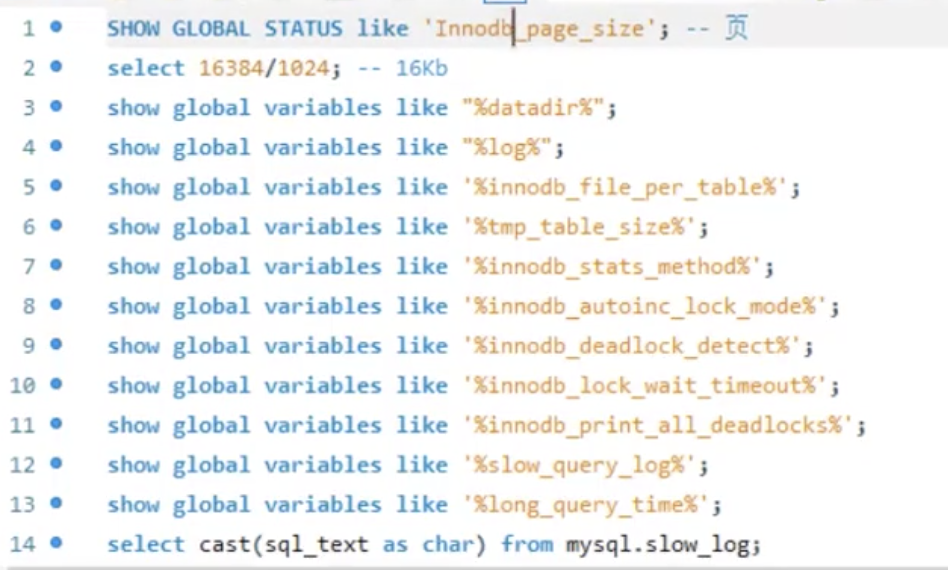
show global status like "Innodb_page_size"
返回为:
Innodb_page_size 16384
单位为字节(Byte).
16384/1024=16,即为16KB
而对于Linux操作系统,其默认的文件系统的页大小为
getconf PAGE_SIZE
即4KB.
(Mac也支持该命令,且默认的Page大小也是4KB)
mysql中, 一个int类型占4个字节,对于varchar,最多可以占65532字节即64KB(最多能存纯汉字21844个),但绝大多数情况下,不会超过100Byte.
MySQL中varchar最大长度是多少?
即一般情况下,一行记录不太会超过1000Byte.
也就是说,一般一个Page能存10-20行数据
根据局部性原理 , 当执行查询某条记录时,会把那一页的查出来放在内存,所以再查其相邻几行记录时,少了磁盘IO速度会快得多.
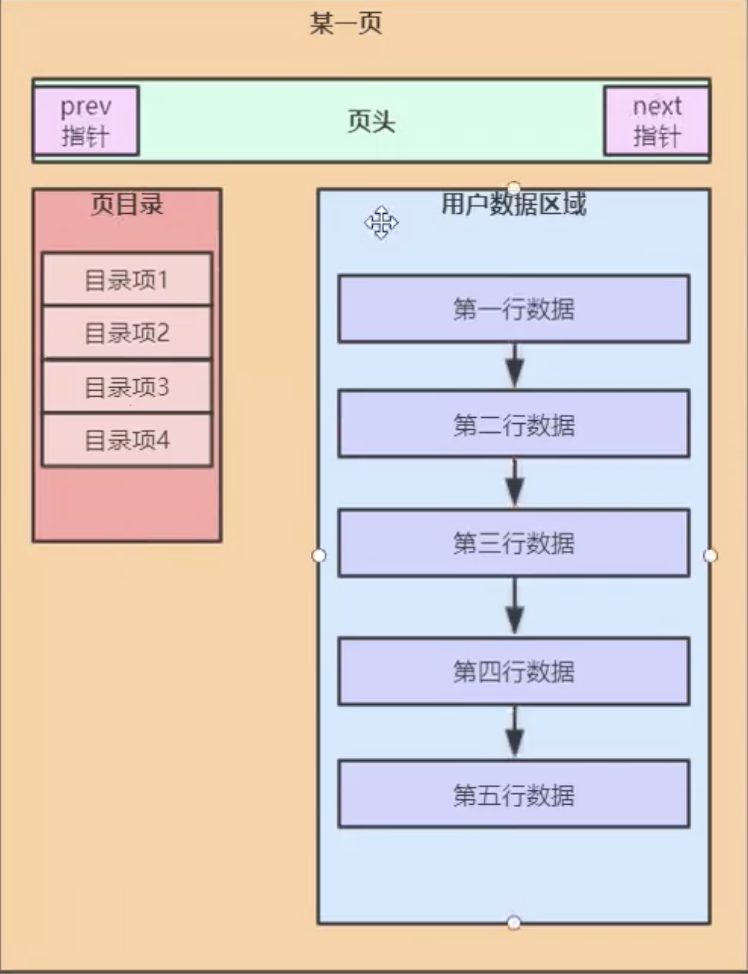
Mysql的”页”,有三个重要的结构: 页头 ,页目录 ,用户数据区
链表和数组正好相反, 链表写易读难.
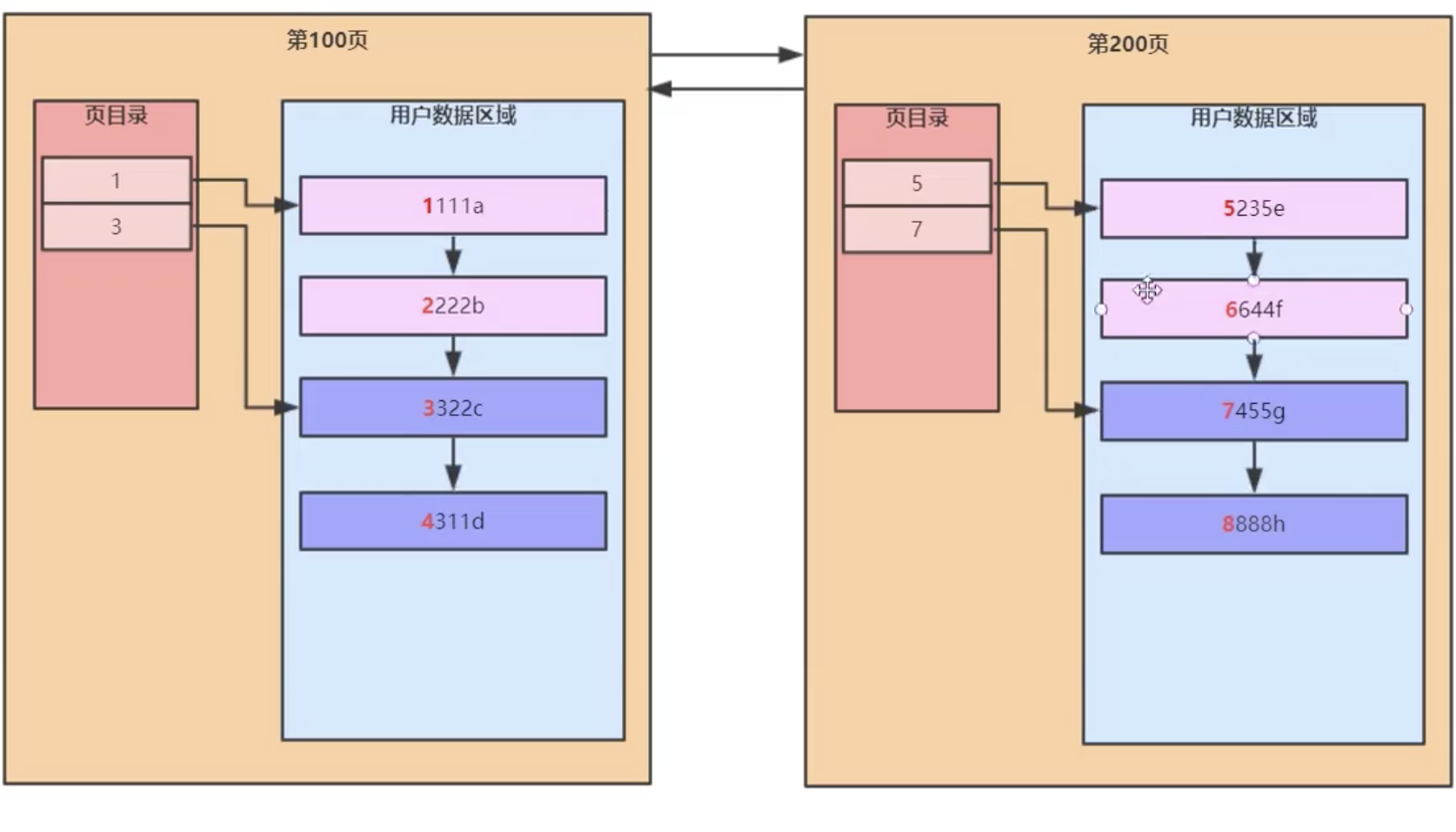
页目录存放这一组的范围(即这一组记录行中,id的起始值和终点值----实际只需要记起点值,终点值即下一组的起点)
页目录 这个东西,才是真正提高检索效率的东西
当这一页(16KB空间)已经放满了数据(比如放了18行),则需要新开辟一页.
写入时需要(重新)排序,这个动作任何(写入)时都会有,所以提升读效率的同时,降低了写的效率.
页头部分有两个指针,指向前一页和后一页.
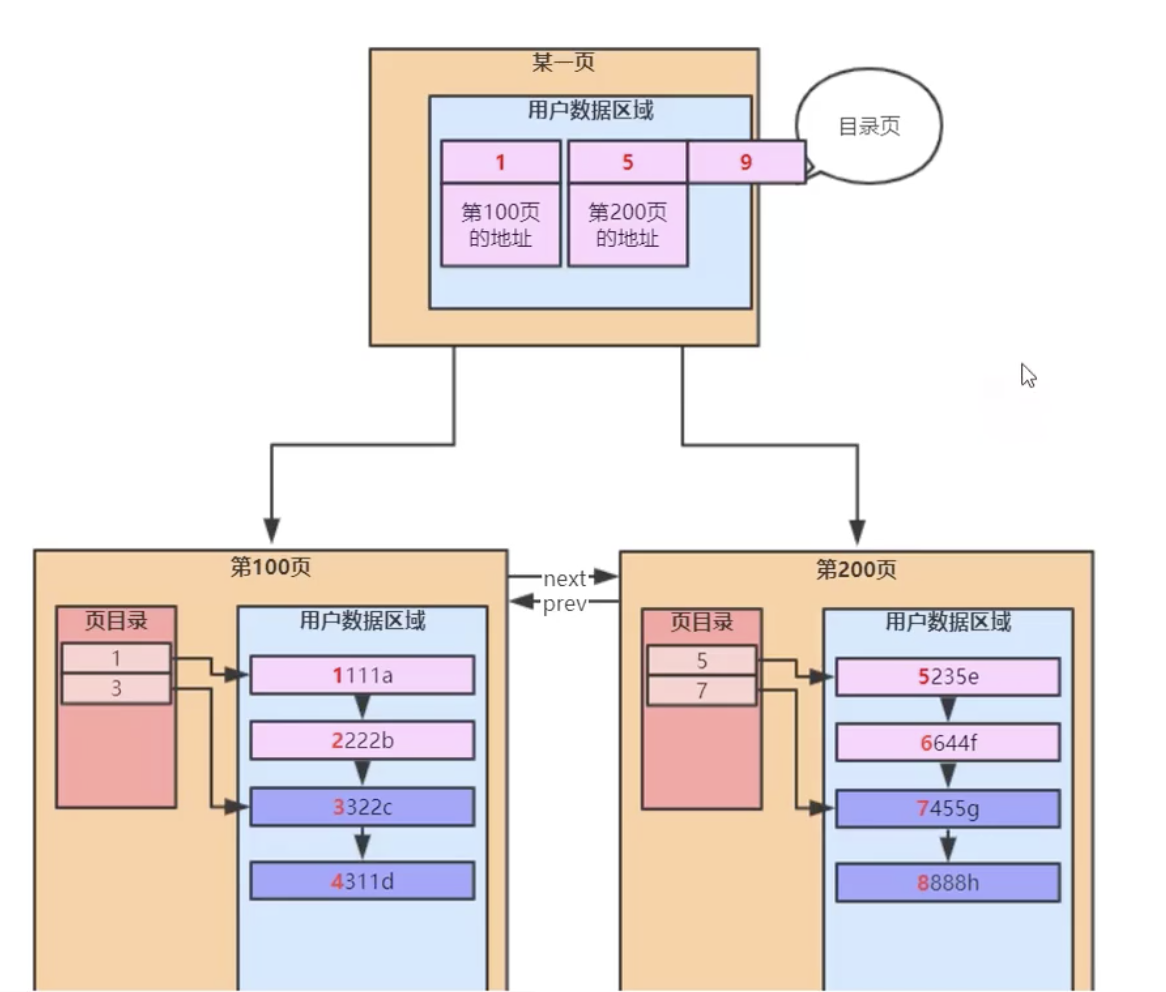
当记录有几千几万行,由一个个page组成的一个链表,又会出现之前的问题.
把每一页,当做之前的每一行,再增加一个用于管理页 的目录,称为目录页 ,被它管理的这些个页,成为数据页 .
(注意区分目录页和数据页的页目录)
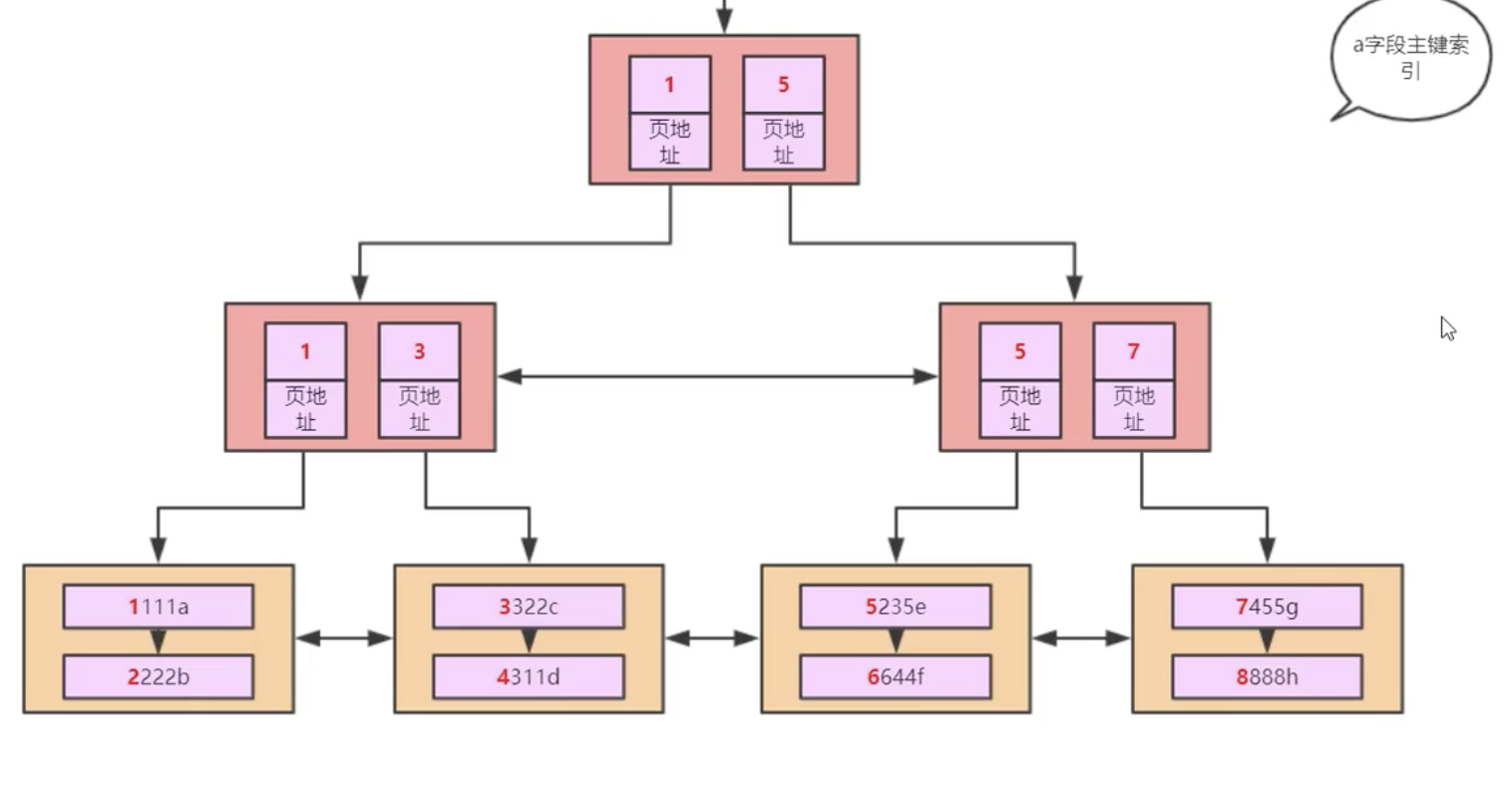
这就是一棵B+树(其实和学术上的纯粹B+树不完全一致)
abcde五个字段,a为主键,abcd均为int型,e为varchar类型
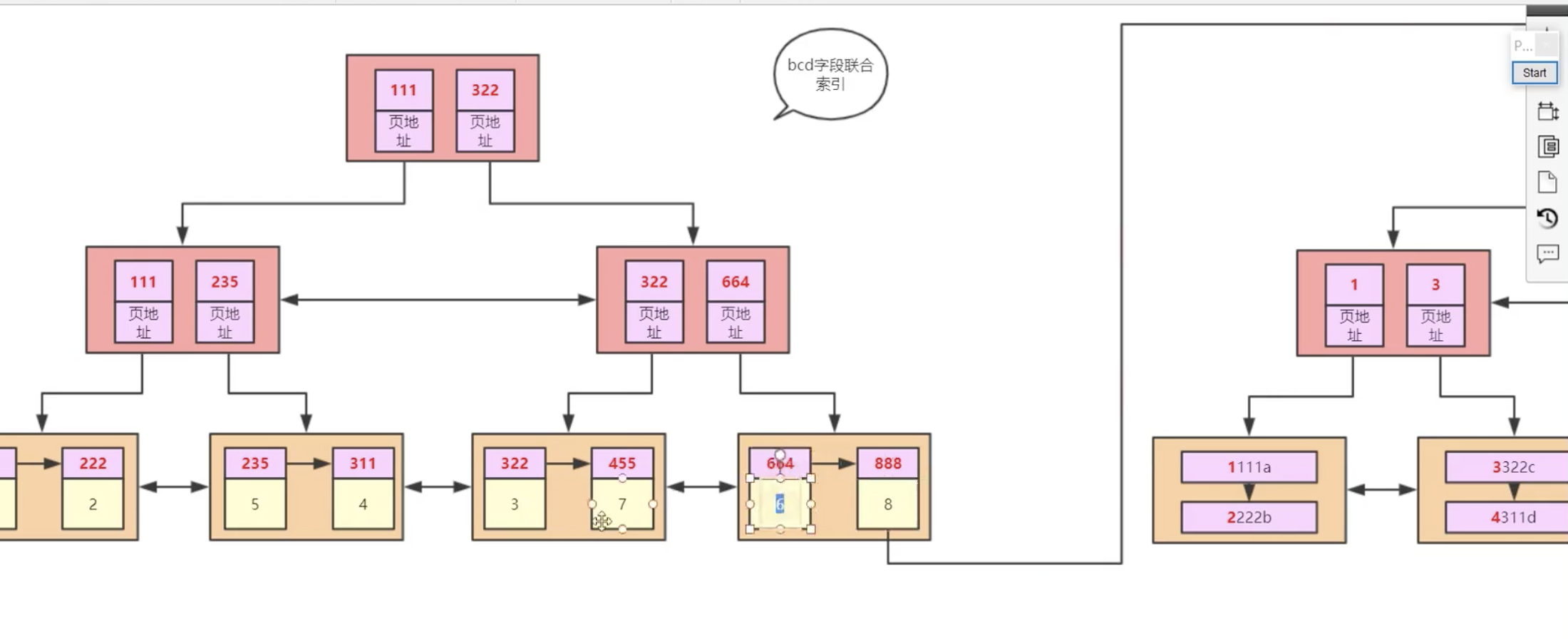
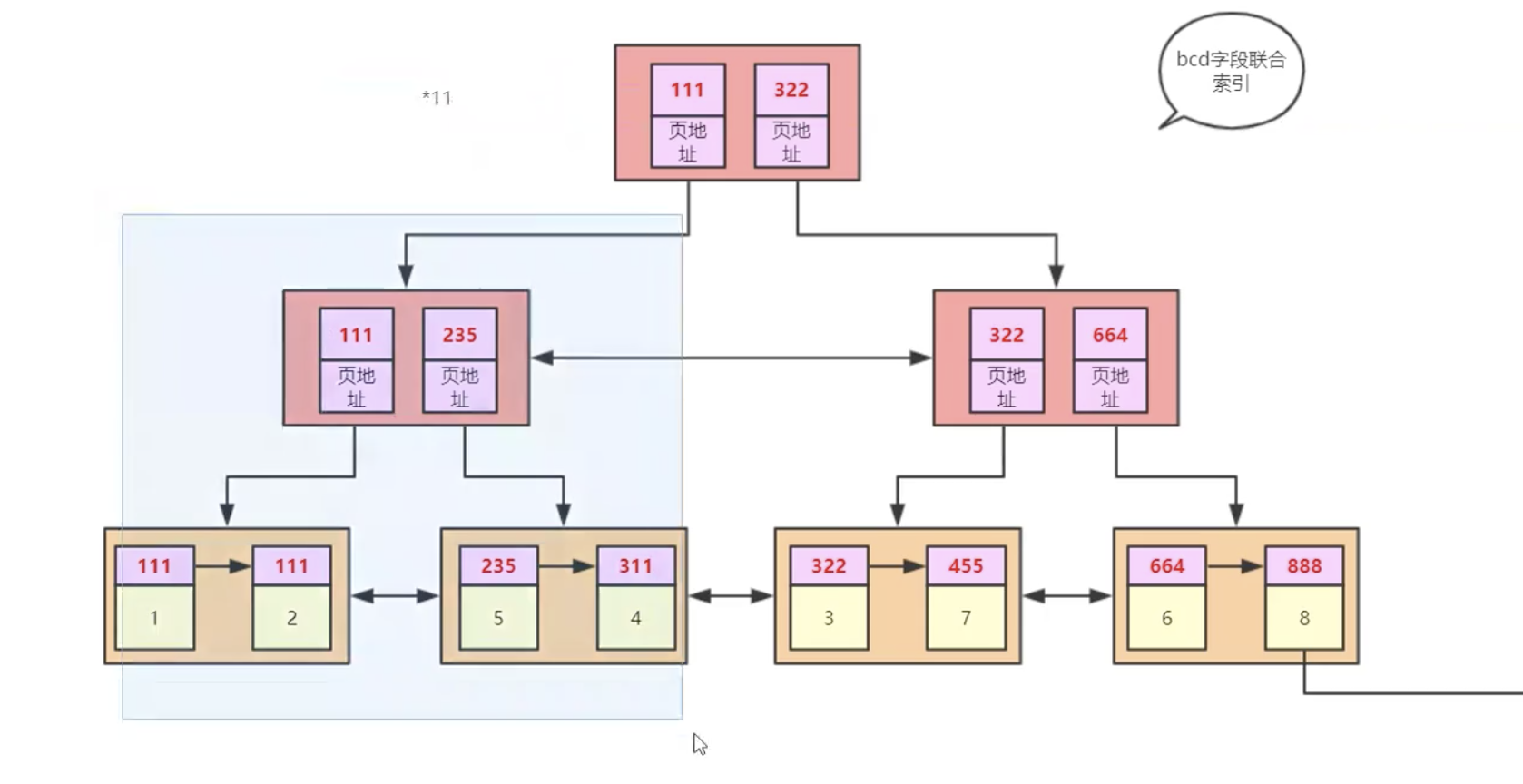
create index idx_t1_bcd on t1(b,c,d),
为t1表的bcd字段,创建一个联合索引,名为idx_t1_bcd
B+树的一个节点可以存多个元素
随着数据增多,其深度 (或称高度 )增加的不多
MySql中的”索引”,和es中的”索引”,含义不完全一样.
以上都是以主键的大小对一行行记录进行排序.
同时还是聚簇索引(或称 聚集索引),即 数据和索引存放在一起(上图中最底层为用户数据,其上为索引数据; 即叶子节点为用户数据,非叶子节点为索引数据).
在MySiam中,不存在聚集索引,即数据和索引是分开的. 在Innodb中,主键索引就是一个聚簇索引.
如果从上到下找,则用到了索引; 如果从左到右找,就是全表扫描.
对于非主键索引,下图黄色部分,存的实际是其对应记录的主键的值.
如果不这样的话, 如上图是”b-c-d”的联合索引,此时只能得到bcd的值. 但如果查询的是select *,如果不存黄色部分即主键的值, 是拿不到其他字段的值; 而如果有主键的值,就可以再进行一次查询,拿到整条记录的所有字段的信息(主键那个索引的每个叶子节点,即存了一行记录的全部信息, abcde 5个字段都存了)
这也就是建联合索引的意义. 所以即便where后面的是b=? and c=? and d=?,但如果前面是select *或select e,那还是无法避免回表 . 如果前面是select b,c,d,则无需回表
对于Innode,完整的数据,只存在主键索引的叶子节点上面..所以但凡是select *,都少不了要去那里查
“最左匹配原则”,也称”最左前缀原则”
当除了主键索引,只还有一个’bcd’的联合索引,select * from t1 where c=1 and d=2,这时是会全表扫描,而无法走索引.(explain一下, 结果的type字段肯定是ALL)
从数学上看, 就是在一个按大小排好序的树状结构里,11*是可以确定大致范围的,而*11则不行. 这其实就是最左匹配 的数学含义
B+树 就是按照比较大小的规则排序而来的…
like “%123” 同理
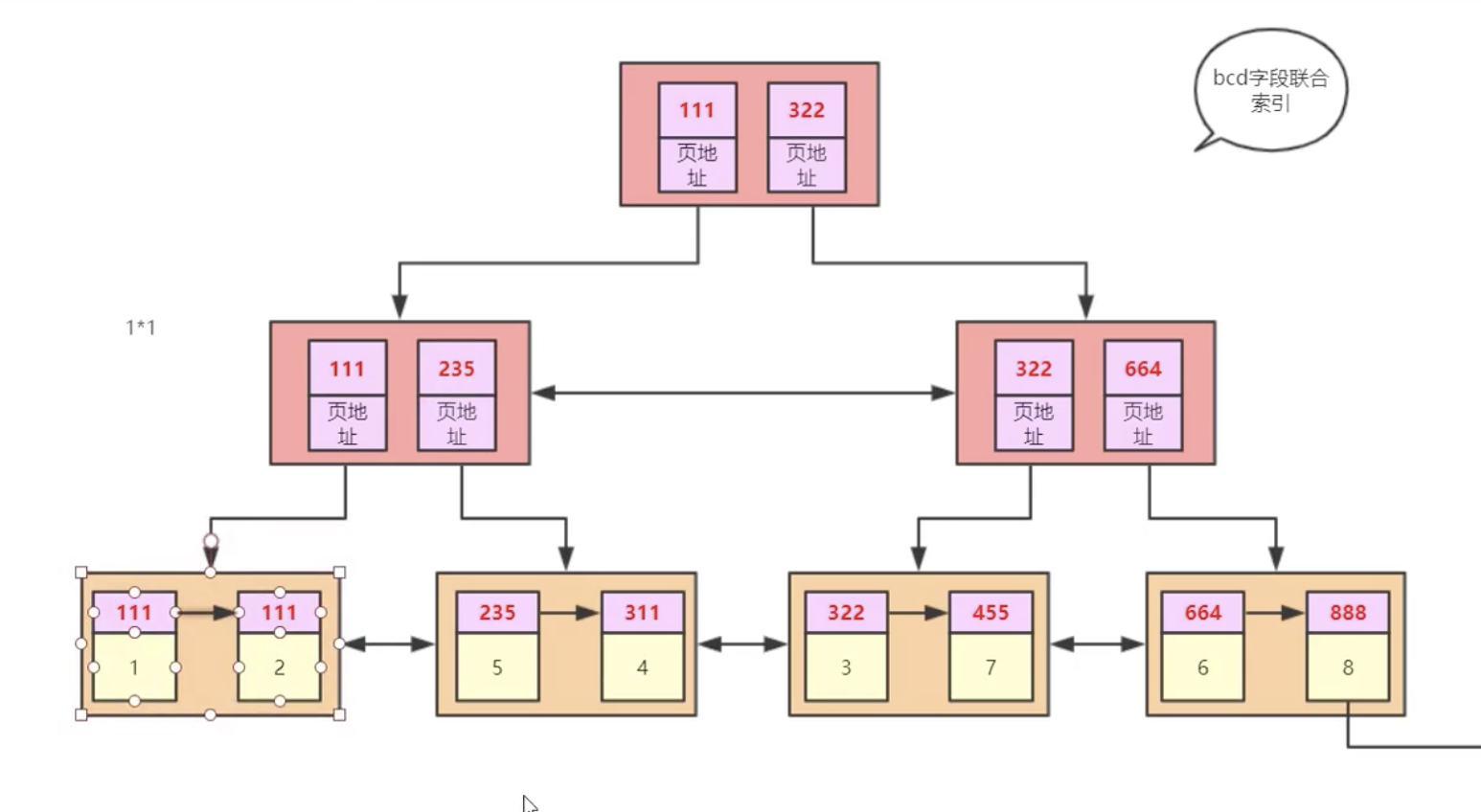
如果是select * from t1 where b=1 and d=2,
即1*1, 其实是会走索引, 但只能确定一个范围.
explain看一下,type字段值为ref, key_len字段为5,即走了索引的字段的大小 (int型占4个字节,还有可能为null,即占5个字节,如果bcd都走了索引,这个字段的值就是15;如果只有b走了索引,这个字段的值就是5)
对于不等操作, 如
select * from t1 where a>1,
可以走索引,先按=1查找,找到之后,叶子节点之间的指针就起了作用,在=1对应的位置右侧的值都符合条件.
对于
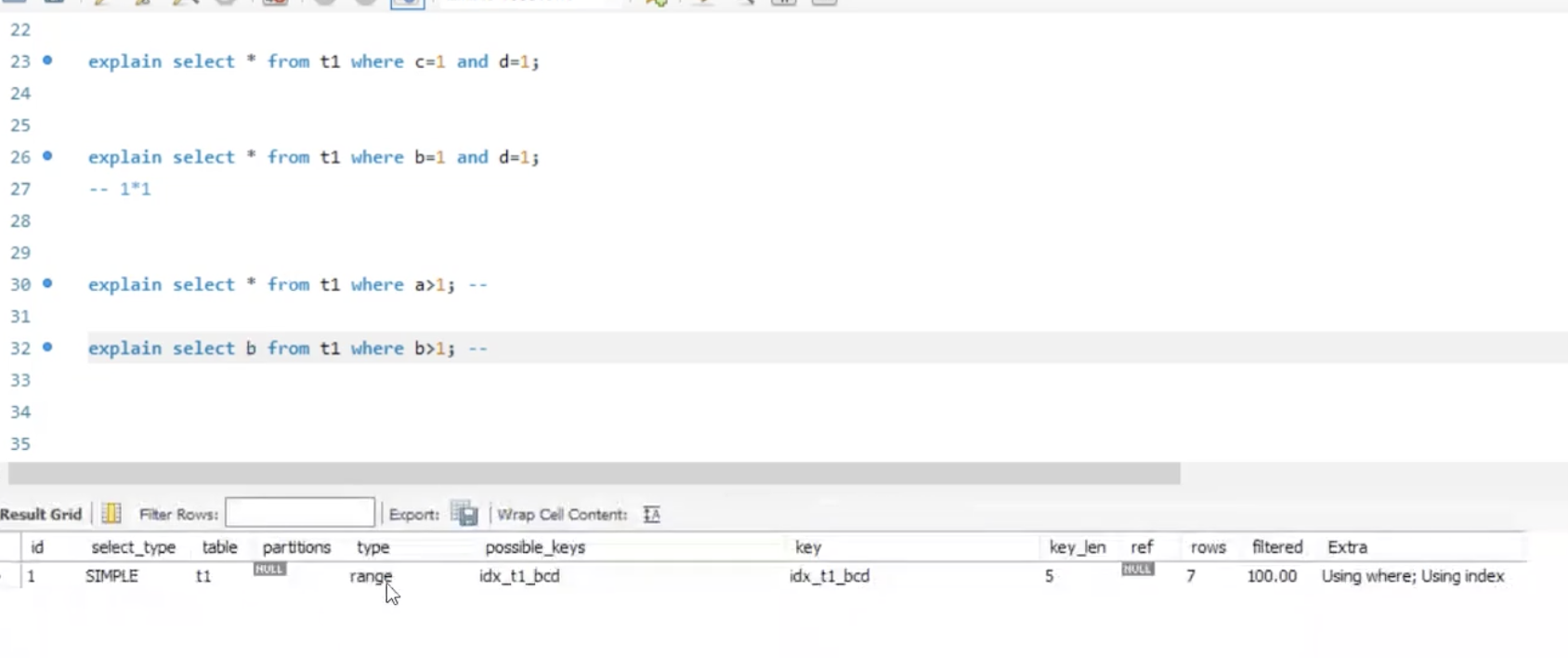
select * from t1 where b>1,
explain之后的type字段是ALL,即没有走索引.但possible_key字段不为null,即可以走索引,但还是选了全表扫描. 这是因为虽然可以从上往下查用上索引(bcd为联合索引),但因为是select *,还得回表,而且是回表多次(有多少行符合条件的记录,就得回表那么多次)…在记录数不多时,不如全表扫描效率更高.
如果是select b from t1 where b>1,则会走索引(range)
select * from t1 where b>5 (假设共有7行记录)
这时也是会走索引的(range), 查询优化器会做权衡,决定到底用哪一种
如果不加where条件,即如
select * from t1 ,
目的是找到表中所有b字段的值.
这个值在当前(这两个索引下)的表中,有两个地方有,即在bcd索引和在主键索引上.
那会从那个地方取呢?
主键索引的叶子节点存的是 一行记录 完整的数据,而bcd的叶子节点存的只是部分字段(即bcd)的数据,同样大小的一个page, bcd索引能存放的记录行数更多.(或者说,相同的记录数,bcd用的page更少)
explain一下,type字段为index. 前面的索引检索方式都是从上到下,这里是利用了叶子节点从左到右来扫描.
先看这样几条sql:
select 1=1 返回为1,即认为相等.
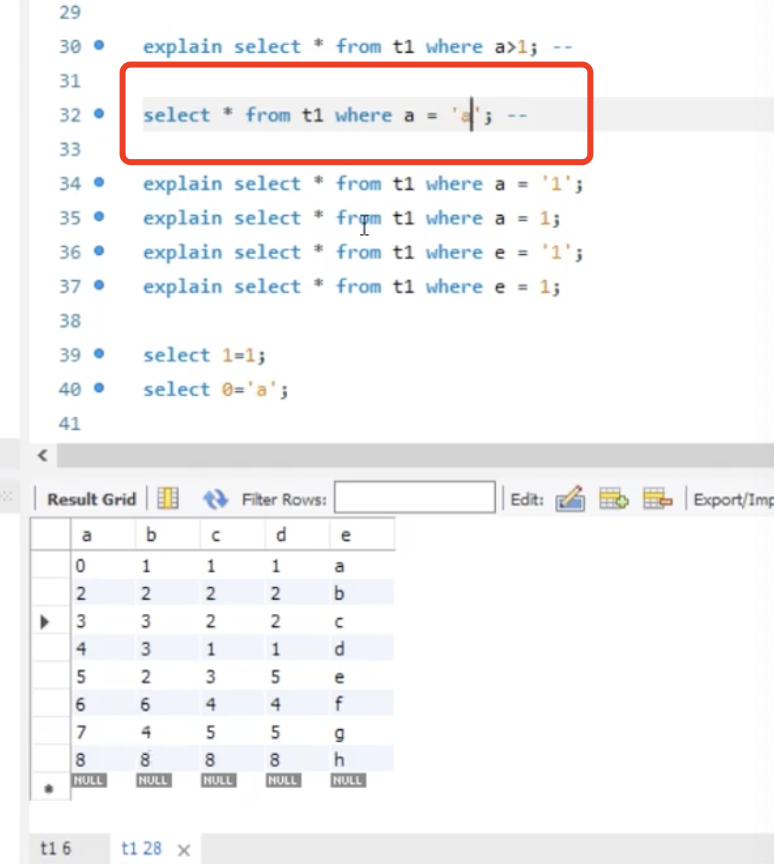
select 0='a' 返回为1,mysql认为两者相等
select 0='1' 返回为0
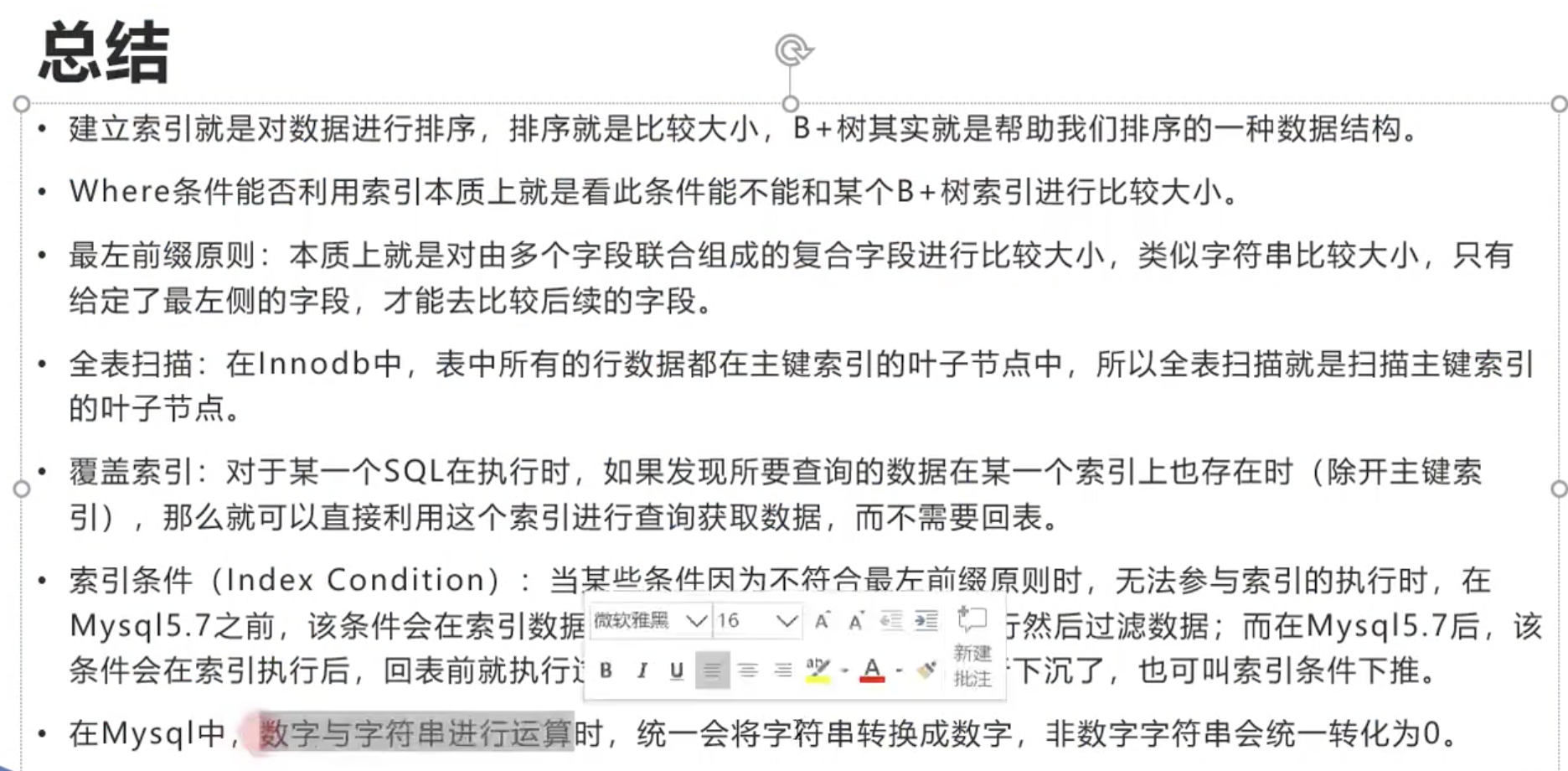
两个数据类型不同的值进行比较时,需要先进行类型转换.
如果是数字类型的字符,则会转为其对应的int型.
如果不是,比如为”abcd”,则直接会转为0..
这会引发出很多问题….
如下图,结果会是第一条记录
再创建一个索引:
select index idx_t1_e on t1(e)
对于:
select * from t1 where a = '1' // ‘1’会被转换为1,可以走索引
select * from t1 where a = 1 // 本来就可以走索引
select * from t1 where e = '1' // 本来就可以走索引
select * from t1 where e = 1 // 不会走索引..需要把字符转换为数字,需要把t1表所有的e字段的记录都转为int后,才可以执行判断..这时索引已经没有作用了…
在执行sql时需要 类型转换/计算/日期格式的转换 等时,如果需要对整张表的某个字段对操作,则不会走索引.
如
select * from t1 where a+1 = 2, 不会走索引(type字段为ALL),需要全表扫描(即会认为需要对所有的a都先加1)
limit
使用limit时,越取后面的会越慢,即
select * from t1 limit 0,1000
和
select * from t1 limit 10000,11000,
后者要慢的多.
因为找起点时,后者要花更多时间.
解决办法:
加一个子查询,
order by
select * from t1 order by b asc, c asc, d asc
不会走索引,而会全表扫描. 且explain的Extra字段是Using filesort (之前大多为where )
会先把bcd字段所有的记录取出来,然后在内存的buffer中进行排序.如果数据量非常大,内存不够,就需要用到文件(磁盘)做swap交换.
排序本身还是比较快的.
而如果走bcd索引,虽然已经排好序了,但是,用的是select *,需要回表…需要把这n条数据每一个主键,重新走一遍主键索引…这样还不如全表扫描再排序
如果是
select b from t1 order by b asc, c asc, d asc,
则会利用bcd索引,从左到右走一遍.explain的type字段为index
(index一般是叶子节点从左到右扫描)
如果是
select * from t1 where b=1 order by b asc, c asc, d asc,
这样回表的成本就小多了,有可能会走bcd这个索引
如果是
select * from t1 where order by b asc, c asc, d desc,
这样是用不到索引的.
mysql 8.0 正式支持降序索引 (之前版本只是语法上支持)
对于如下创建索引的语句:
create index idx_t1_bcd on t1(b asc,c asc,d desc),
8.0之前,不管怎么写,底层其实都是asc(只是语法上支持,所以8.0之前创建索引时,都省略后面的asc/desc)
8.0之后,desc起作用了
所以在8.0中,如果建这样的索引create index idx_t1_bcd on t1(b asc,c asc,d desc),上面的sql是可以用到索引的
更多 参考:
Backward index scan
基于一些合理的前提和假设,当B+树高度为3时,最多只能存2000多万行数据.
B+树变成4层,即多了一次磁盘IO,效率便会大幅度降低.
假设一行记录的数据大小为1k,实际上现在很多互联网业务数据记录大小通常就是1K左右.
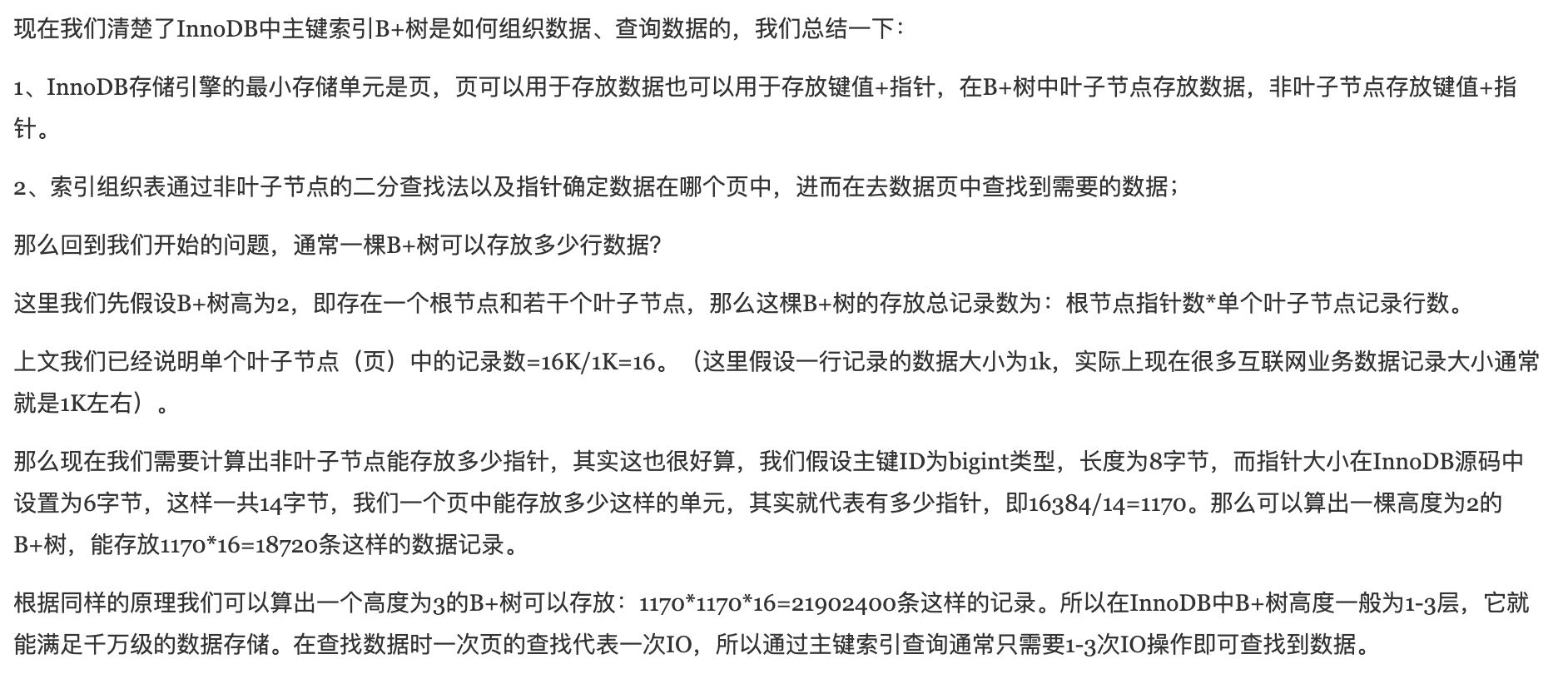
所以(主键索引中)叶子节点的一个节点(即一个page,且为数据页),在这里认为可以放16行记录.
假设主键ID为bigint类型(长度为8字节),而指针大小在InnoDB源码中是6字节 ,这样一共14字节,我们一个页(Page,在此为目录页)中能存放多少这样的(索引)单元,其实就代表有多少指针,即16384/14=1170。即一个目录Page,能存大概1170个(索引)单元.
那么可以算出一棵高度为2的B+树,能存放1170*16=18720条这样的数据记录。
根据同样原理, 可以算出一个高度为3的B+树可以存放:1170*1170*16=21902400条这样的记录。
所以在InnoDB中B+树高度一般为1-3层,就能满足千万级的数据存储。在查找数据时一次页的查找代表一次磁盘IO ,所以通过主键索引查询通常只需要1-3次IO操作即可查找到数据。
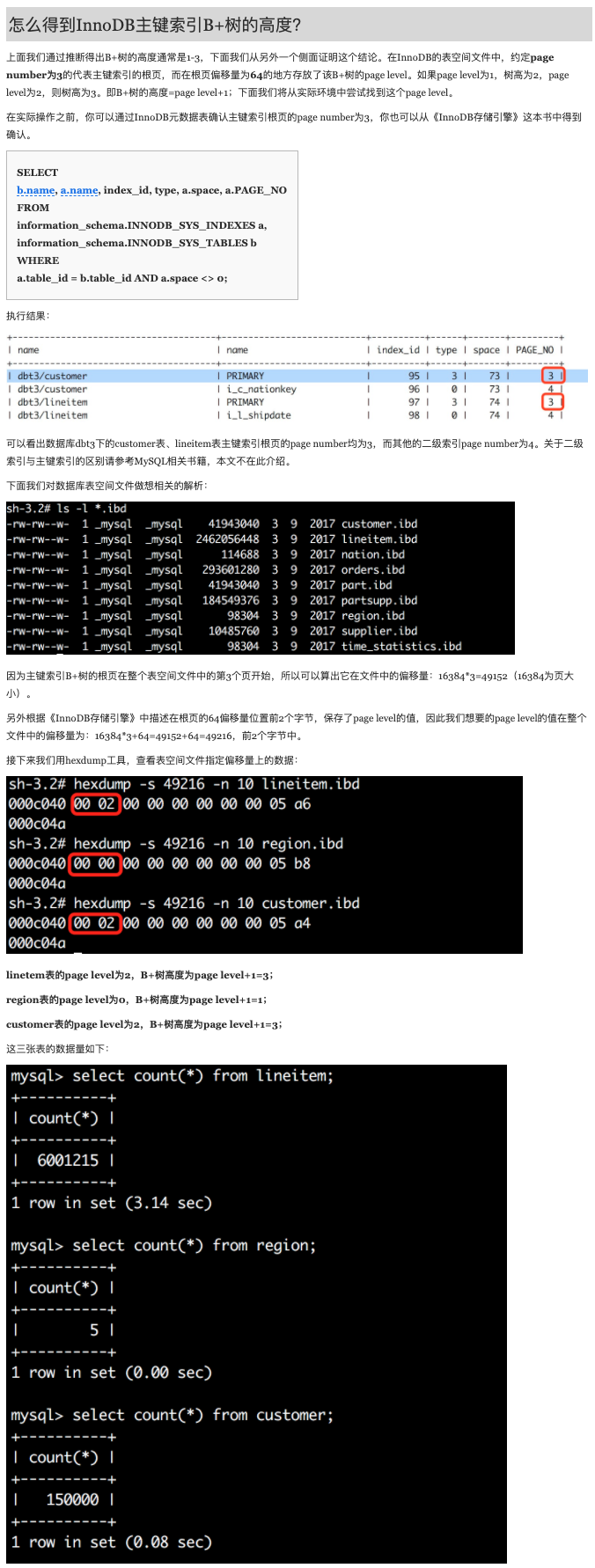
“在InnoDB的表空间文件中,约定page number为3的代表主键索引的根页,而在根页偏移量为64的地方存放了该B+树的page level。如果page level为1,树高为2,page level为2,则树高为3。即B+树的高度=page level+1;”
1
2
3
4
5
6
7
SELECT b.name, a.name, index_id, type, a.space, a.PAGE_NO FROM information_schema.INNODB_SYS_INDEXES a, information_schema.INNODB_SYS_TABLES b WHERE a.table_id = b.table_id AND a.space <> 0 ;
详细操作参见原文:InnoDB一棵B+树,可以存放多少行数据
结论:
表A的数据行数为600多万,B+树高度为3,表B的数据行数只有15万,B+树高度也为3。可以看出尽管数据量差异较大,这两个表树的高度都是3,换句话说这两个表通过索引查询效率并没有太大差异,因为都只需要做3次IO。如果有一张表行数是一千万,那么其B+树高度依旧是3,查询效率仍然不会相差太大。
当然如果一张表只有5行数据,那么它的B+树高度为1。
即当数据量在18720到21902400行之间时,B+树的高度都是3,查询的速度几乎相同.
因为二分查找是在内存里边进行的,速度很快.和磁盘IO差几个数量级,可以忽略. 那么即从2万行记录到2200万行记录,主体的查询性能差不多
参考:
InnoDB一棵B+树,可以存放多少行数据
备存地址
索引和锁 有非常密切的关系
原文链接: https://dashen.tech/2019/07/29/InnoDB一棵B-树-可以存放多少行数据/
版权声明: 转载请注明出处.