Go path&filepath包

本文是对 path/filepath — 兼容操作系统的文件路径操作的学习与记录


path和filepath的联系与区别


注释中也有说明:

Package path implements utility routines for manipulating slash-separated paths.
The path package should only be used for paths separated by forward slashes, such as the paths in URLs. This package does not deal with Windows paths with drive letters or backslashes; to manipulate operating system paths, use the path/filepath package.

路径 这个package 实现了用于操作斜杠分隔路径的实用程序。
path 包只能用于由正斜杠分隔的路径,例如 URL 中的路径。 此软件包不处理带有驱动器号或反斜杠的 Windows 路径; 要操作操作系统路径,请使用 path/filepath 包。


Package filepath implements utility routines for manipulating filename paths in a way compatible with the target operating system-defined file paths.

The filepath package uses either forward slashes or backslashes,depending on the operating system. To process paths such as URLs that always use forward slashes regardless of the operating system, see the path package.

文件路径 这个package 实现了用于以与目标操作系统定义的文件路径兼容的方式操作文件名路径的实用程序例程。

文件路径包 使用正斜杠或反斜杠,具体取决于操作系统。 要处理无论操作系统如何都始终使用正斜杠的 URL 等路径,请参阅路径包。

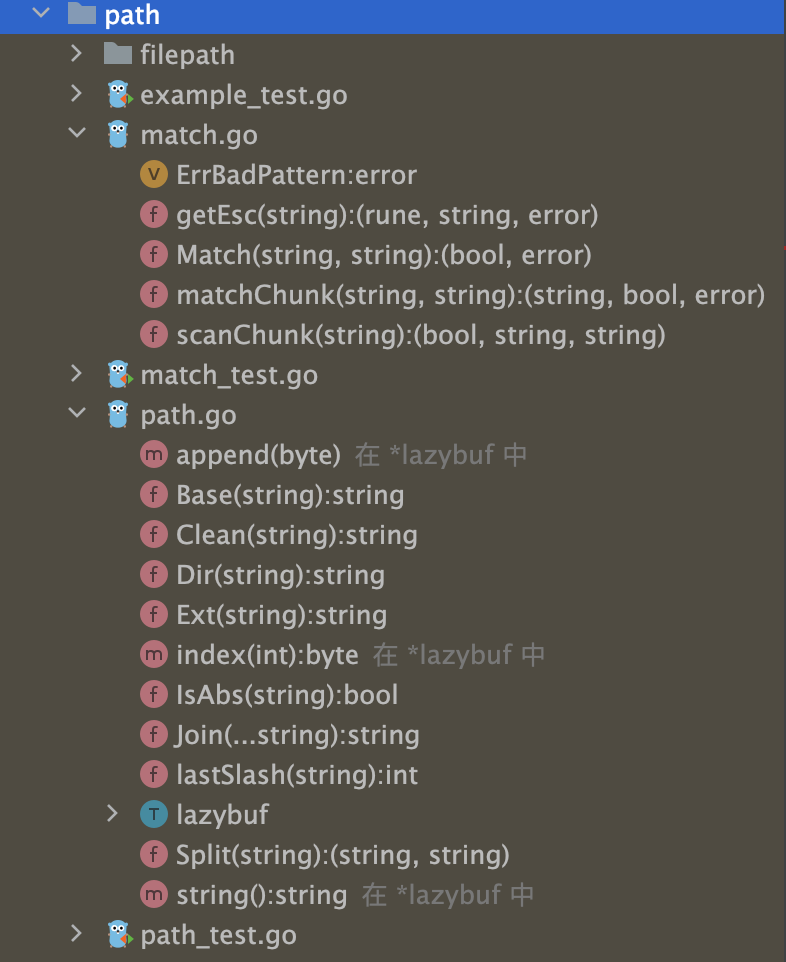
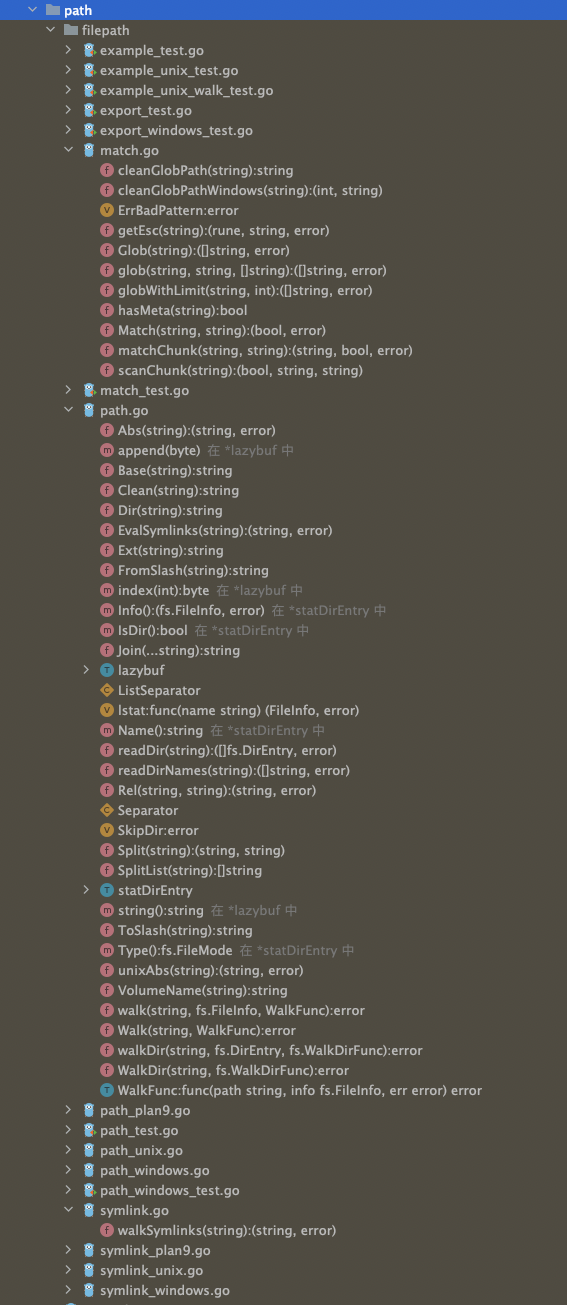
path 包只能用于由正斜杠(/)分隔的路径,例如 URL 中的路径

要对操作系统路径进行操作,需要使用 path/filepath包

即filepath其实是path的超集, path 包中的同名函数,和filepath在*nix体系下(路径分隔符为 ‘/‘)效果一致

path 包中提供的函数,filepath 都有提供,功能类似,但实现不同。一般应该总是使用 filepath 包,而不是 path 包


分解路径名 (Dir/Base/Ext)


Dir() 和 Base() 函数将一个路径名字符串分解成目录和文件名两部分

1
2
3
4
5
6
7
8
9
10
11
12
13
14
15
16
17
18
19
20
21
22
package main

import (
"fmt"
"path/filepath"
)

func main() {

str := "/Users/fliter/go/src/shuang/pathh/cui.go"

// Dir 返回路径中除去最后一个路径元素的部分,即该路径最后一个元素所在的目录
fmt.Println(filepath.Dir(str)) // /Users/fliter/go/src/shuang/pathh

// Base 函数返回路径的最后一个元素。在提取元素前会去掉末尾的斜杠。如果路径是 "",会返回 ".";如果路径是只有一个斜杆构成的,会返回 "/"
fmt.Println(filepath.Base(str)) // cui.go

// Ext 函数返回 path 文件扩展名。扩展名是路径中最后一个从 . 开始的部分,包括 .。如果该元素没有 . 会返回空字符串
fmt.Println(filepath.Ext(str)) // cui.go

}


相对路径与绝对路径 (IsAbs/Abs/Rel)


1
2
3
4
5
6
7
8
9
10
11
12
13
14
15
16
17
18
19
20
21
22
23
24
25
26
27
28
29
30
31
32
33
34
35
36
37
38
package main

import (
"fmt"
"path/filepath"
)

func main() {

str := "/Users/fliter/go/src/shuang/pathh/cui.go"

// IsAbs 返回路径是否是一个绝对路径
fmt.Println(filepath.IsAbs(str)) // true

str2 := "/fliter/go/src/shuang/pathh/cui.go"

fmt.Println(filepath.IsAbs(str2)) // true, 其实cd的话不会成功

str3 := "fliter/go/src/shuang/pathh/cui.go"
fmt.Println(filepath.IsAbs(str3)) // false

// Abs 函数返回 str 代表的绝对路径,如果 str 不是绝对路径,会加入**当前工作目录**以使之成为绝对路径
fmt.Println(filepath.Abs("pathh/cui.go")) // /Users/fliter/go/src/shuang/pathh/pathh/cui.go <nil>

fmt.Println(filepath.Abs(str3)) // /Users/fliter/go/src/shuang/pathh/fliter/go/src/shuang/pathh/cui.go <nil>

// filepath.Rel(减数,被减数) 差
// Rel 函数返回一个相对路径,有两个入参 basepath 和 targpath,返回一个相对路径,记为relpath。将 basepath 和 relpath 用路径分隔符连起来的新路径在词法上等价于 targpath。即 减数+差=被减数

fmt.Println(filepath.Rel("/Users/fliter/go/src/", "/Users/fliter/go/src/shuang/pathh/abs.go")) // shuang/pathh/abs.go <nil>

fmt.Println(filepath.Rel("/Users1/fliter2/go3/src4/", "/Users/fliter/go/src/shuang/pathh/abs.go")) // ../../../../Users/fliter/go/src/shuang/pathh/abs.go <nil>

// 也就是说,Join(basepath, Rel(basepath, targpath)) 等价于 targpath。如果成功执行,返回值总是相对于 basepath 的,即使 basepath 和 targpath 没有共享的路径元素。如果两个参数一个是相对路径而另一个是绝对路径,或者 targpath 无法表示为相对于 basepath 的路径,将返回错误。

// fmt.Println(filepath.Join())

}

路径的切分和拼接 (Split/SplitList/Join)


1
2
3
4
5
6
7
8
9
10
11
12
13
14
15
16
17
18
19
20
21
22
23
24
25
26
27
28
29
30
31
32
33
34
35
36
37
38
39
40
41
42
43
44
45
46
47
48
49
50
51
52
53
54
55
56
57
58
59
package main

import (
"fmt"
"path/filepath"
)

func main() {

// 将str切分成(dir, file string)两部分

// Split 根据最后一个 路径分隔符 将路径 path 分隔为目录和文件名两部分(dir 和 file)。如果路径中没有路径分隔符,函数返回值 dir 为空字符串,file 等于 path;反之,如果路径中最后一个字符是 /,则 dir 等于 path,file 为空字符串。返回值满足 path == dir+file。dir 非空时,最后一个字符总是 /

dir, file := filepath.Split("/usr/local/openresty/nginx/conf/domain/blog.conf")
fmt.Printf("路径为%s,文件为%s\n", dir, file) // 路径为/usr/local/openresty/nginx/conf/domain/,文件为blog.conf

dir1, file1 := filepath.Split("/usr/local/openresty/nginx/conf/domain/blog")
fmt.Printf("路径为%s,文件为%s\n", dir1, file1) // 路径为/usr/local/openresty/nginx/conf/domain/,文件为blog

dir2, file2 := filepath.Split("/usr/local/openresty/nginx/conf/domain/blog/")
fmt.Printf("路径为%s,文件为%s\n", dir2, file2) // 路径为/usr/local/openresty/nginx/conf/domain/blog/,文件为


// SplitList 用于拆分路径,以PathListSeparator为分隔符(unix为: windows为;),返回一个数组
// 一般用来处理 PATH 或 GOPATH等
path := `/Users/fliter/.g/go/bin:/Users/fliter/go/bin:/opt/homebrew/opt/node@12/bin:/Users/fliter/bin:/Users/fliter/.g/go/bin:/Users/fliter/.gvm/bin:/opt/homebrew/opt/node@12/bin:/opt/homebrew/bin:/opt/homebrew/sbin:/usr/local/bin:/usr/bin:/bin:/usr/sbin:/sbin:/usr/local/go/bin:/usr/local/aria2/bin:/Library/Apple/usr/bin:/Users/fliter/.cargo/bin:/opt/homebrew/Cellar/go/1.17.7/libexec/bin:/Users/fliter/go/bin:/Users/fliter/Downloads/:/bin:/usr/local/MongoDB/bin:/usr/local/Cellar/ffmpeg/4.3.1/bin:/usr/local/mysql/bin:/usr/local/mysql/support-files:/Users/fliter/.cargo/bin`

res := filepath.SplitList(path)
fmt.Println("SplitList结果为:", res) //SplitList结果为: [/Users/fliter/.g/go/bin /Users/fliter/go/bin /opt/homebrew/opt/node@12/bin /Users/fliter/bin /Users/fliter/.g/bin /Users/fliter/.gvm/bin /opt/homebrew/opt/node@12/bin /opt/homebrew/bin /opt/homebrew/sbin /usr/local/bin /usr/bin /bin /usr/sbin /sbin /usr/local/go/bin /usr/local/aria2/bin /Library/Apple/usr/bin /Users/fliter/.cargo/bin /opt/homebrew/Cellar/go/1.17.7/libexec/bin /Users/fliter/go/bin /Users/fliter/Downloads/ /bin /usr/local/MongoDB/bin /usr/local/Cellar/ffmpeg/4.3.1/bin /usr/local/mysql/bin /usr/local/mysql/support-files /Users/fliter/.cargo/bin]
fmt.Println("SplitList长度为:", len(res)) // SplitList长度为: 27


// 相对路径到绝对路径的转变,需要经过路径的拼接。Join 用于将多个路径拼接起来,会根据情况添加路径分隔符
// Join 可将任意数量的路径元素放入一个单一路径中,会根据需要添加路径分隔符。结果是会经过 Clean处理的,所有的空字符串元素会被忽略。
//
// 对于拼接路径的需求,应该总是使用 Join 函数来处理

fmt.Println(filepath.Join("a", "b", "c")) // a/b/c
fmt.Println(filepath.Join("a", "b/c")) // a/b/c
fmt.Println(filepath.Join("a/b", "c")) // a/b/c

fmt.Println(filepath.Join("a/b", "../../../xyz")) // ../xyz

fmt.Println(filepath.Join("", "")) // (空)
fmt.Println(filepath.Join("a", "")) // a
fmt.Println(filepath.Join("", "a")) // a


}


规整化路径 (Clean)


这是最神奇的一个函数,上面的Join有调用,在许多知名项目中,也有直接使用,如下

golang.org/x/tools

golang.org/x/net

golang.org/x/sys

golang.org/x/mobile

golang.org/x/mod

github.com/gin-gonic/gin

github.com/spf13/viper

github.com/spf13/afero

github.com/coreos/etcd

github.com/fsnotify/fsnotify

github.com/gopherjs/gopherjs

github.com/kevinburke/ssh_config

github.com/fastly/go-utils

github.com/bsm/ginkgo

github.com/nxadm/tail

github.com/go-git/go-billy

github.com/go-git/go-git

github.com/census-instrumentation/opencensus-go

1
2
3
4
5
6
7
8
9
10
11
12
13
14
15
16
17
18
19
20
21
22
23
24
25
26
27
28
29
30
31
32
33
34
35
36
37

Clean returns the shortest path name equivalent to path
by purely lexical processing. It applies the following rules
iteratively until no further processing can be done:
1. Replace multiple Separator elements with a single one.
2. Eliminate each . path name element (the current directory).
3. Eliminate each inner .. path name element (the parent directory)
along with the non-.. element that precedes it.
4. Eliminate .. elements that begin a rooted path:
that is, replace "/.." by "/" at the beginning of a path,
assuming Separator is '/'.
The returned path ends in a slash only if it represents a root directory,
such as "/" on Unix or `C:\` on Windows.
Finally, any occurrences of slash are replaced by Separator.
If the result of this process is an empty string, Clean
returns the string ".".
See also Rob Pike, ``Lexical File Names in Plan 9 or
Getting Dot-Dot Right,''
https://9p.io/sys/doc/lexnames.html

Clean 函数通过单纯的词法操作返回和 path 代表同一地址的最短路径。

它会不断的依次应用如下的规则,直到不能再进行任何处理:

将连续的多个路径分隔符替换为单个路径分隔符
剔除每一个 . 路径名元素(代表当前目录)
剔除每一个路径内的 .. 路径名元素(代表父目录)和它前面的非 .. 路径名元素
剔除开始于根路径的 .. 路径名元素,即将路径开始处的 /.. 替换为 /(假设路径分隔符是 /)
返回的路径只有其代表一个根地址时才以路径分隔符结尾,如 Unix 的 / 或 Windows 的 C:\。

如果处理的结果是空字符串,Clean 会返回 .,代表当前路径。

See also Rob Pike, ``Lexical File Names in Plan 9 or
Getting Dot-Dot Right,''
https://9p.io/sys/doc/lexnames.html


filepath.EvalSymlinks 会将所有路径的符号链接都解析出来

可对比 os.Readlink 和 filepath.EvalSymlinks:

1
2


文件路径匹配 (Match/Glob)


1


遍历目录 (Walk)


1


仅针对Windows系统的函数 (VolumeName、FromSlash 和 ToSlash)


VolumeName、FromSlash 和 ToSlash,针对非 Unix 平台


更多参考:

path/filepath

package path

Golang学习 - path/filepath 包