<shuangcui@~>$ kubectl kubectl controls the Kubernetes cluster manager.
Find more information at: https://kubernetes.io/docs/reference/kubectl/overview/
Basic Commands (Beginner): create Create a resource from a file or from stdin. expose Take a replication controller, service, deployment or pod and expose it as a new Kubernetes Service run Run a particular image on the cluster set Set specific features on objects
Basic Commands (Intermediate): explain Documentation of resources get Display one or many resources edit Edit a resource on the server delete Delete resources by filenames, stdin, resources and names, or by resources and label selector
Deploy Commands: rollout Manage the rollout of a resource scale Set a new size for a Deployment, ReplicaSet, Replication Controller, or Job autoscale Auto-scale a Deployment, ReplicaSet, or ReplicationController
Cluster Management Commands: certificate Modify certificate resources. cluster-info Display cluster info top Display Resource (CPU/Memory/Storage) usage. cordon Mark node as unschedulable uncordon Mark node as schedulable drain Drain node in preparation for maintenance taint Update the taints on one or more nodes
Troubleshooting and Debugging Commands: describe Show details of a specific resource or group of resources logs Print the logs for a container in a pod attach Attach to a running container exec Execute a commandin a container port-forward Forward one or more local ports to a pod proxy Run a proxy to the Kubernetes API server cp Copy files and directories to and from containers. auth Inspect authorization
Advanced Commands: diff Diff live version against would-be applied version apply Apply a configuration to a resource by filename or stdin patch Update field(s) of a resource using strategic merge patch replace Replace a resource by filename or stdin wait Experimental: Wait for a specific condition on one or many resources. convert Convert config files between different API versions kustomize Build a kustomization target from a directory or a remote url.
Settings Commands: label Update the labels on a resource annotate Update the annotations on a resource completion Output shell completion code for the specified shell (bash or zsh)
Other Commands: api-resources Print the supported API resources on the server api-versions Print the supported API versions on the server, in the form of "group/version" config Modify kubeconfig files plugin Provides utilities for interacting with plugins. version Print the client and server version information
Usage: kubectl [flags] [options]
Use "kubectl <command> --help"for more information about a given command. Use "kubectl options"for a list of global command-line options (applies to all commands).
<shuangcui@~>$ kubectl get --help Display one or many resources
Prints a table of the most important information about the specified resources. You can filter the list using a label selector and the --selector flag. If the desired resource type is namespaced you will only see results in your current namespace unless you pass --all-namespaces.
Uninitialized objects are not shown unless --include-uninitialized is passed.
By specifying the output as 'template' and providing a Go template as the value of the --template flag, you can filter the attributes of the fetched resources.
Use "kubectl api-resources"for a complete list of supported resources.
Examples: # List all pods in ps output format. kubectl get pods
# List all pods in ps output format with more information (such as node name). kubectl get pods -o wide
# List a single replication controller with specified NAME in ps output format. kubectl get replicationcontroller web
# List deployments in JSON output format, in the "v1" version of the "apps" API group: kubectl get deployments.v1.apps -o json
# List a single pod in JSON output format. kubectl get -o json pod web-pod-13je7
# List a pod identified by type and name specified in "pod.yaml" in JSON output format. kubectl get -f pod.yaml -o json
# List resources from a directory with kustomization.yaml - e.g. dir/kustomization.yaml. kubectl get -k dir/
# Return only the phase value of the specified pod. kubectl get -o template pod/web-pod-13je7 --template={{.status.phase}}
# List resource information in custom columns. kubectl get pod test-pod -o custom-columns=CONTAINER:.spec.containers[0].name,IMAGE:.spec.containers[0].image
# List all replication controllers and services together in ps output format. kubectl get rc,services
# List one or more resources by their type and names. kubectl get rc/web service/frontend pods/web-pod-13je7
Options: -A, --all-namespaces=false: If present, list the requested object(s) across all namespaces. Namespace in current context is ignored even if specified with --namespace. --allow-missing-template-keys=true: If true, ignore any errors in templates when a field or map key is missing in the template. Only applies to golang and jsonpath output formats. --chunk-size=500: Return large lists in chunks rather than all at once. Pass 0 to disable. This flag is beta and may change in the future. --field-selector='': Selector (field query) to filter on, supports '=', '==', and '!='.(e.g. --field-selector key1=value1,key2=value2). The server only supports a limited number of field queries per type. -f, --filename=[]: Filename, directory, or URL to files identifying the resource to get from a server. --ignore-not-found=false: If the requested object does not exist the command will returnexit code 0. -k, --kustomize='': Process the kustomization directory. This flag can't be used together with -f or -R. -L, --label-columns=[]: Accepts a comma separated list of labels that are going to be presented as columns. Names are case-sensitive. You can also use multiple flag options like -L label1 -L label2... --no-headers=false: When using the default or custom-column output format, don't print headers (default print headers). -o, --output='': Output format. One of: json|yaml|wide|name|custom-columns=...|custom-columns-file=...|go-template=...|go-template-file=...|jsonpath=...|jsonpath-file=... See custom columns [http://kubernetes.io/docs/user-guide/kubectl-overview/#custom-columns], golang template [http://golang.org/pkg/text/template/#pkg-overview] and jsonpath template [http://kubernetes.io/docs/user-guide/jsonpath]. --raw='': Raw URI to request from the server. Uses the transport specified by the kubeconfig file. -R, --recursive=false: Process the directory used in -f, --filename recursively. Useful when you want to manage related manifests organized within the same directory. -l, --selector='': Selector (label query) to filter on, supports '=', '==', and '!='.(e.g. -l key1=value1,key2=value2) --server-print=true: If true, have the server return the appropriate table output. Supports extension APIs and CRDs. --show-kind=false: If present, list the resource typefor the requested object(s). --show-labels=false: When printing, show all labels as the last column (default hide labels column) --sort-by='': If non-empty, sort list types using this field specification. The field specification is expressed as a JSONPath expression (e.g. '{.metadata.name}'). The field in the API resource specified by this JSONPath expression must be an integer or a string. --template='': Template string or path to template file to use when -o=go-template, -o=go-template-file. The template format is golang templates [http://golang.org/pkg/text/template/#pkg-overview]. -w, --watch=false: After listing/getting the requested object, watch for changes. Uninitialized objects are excluded if no object name is provided. --watch-only=false: Watch for changes to the requested object(s), without listing/getting first.
在上面的脚本中,将 <pod-name> 替换为您要获取标签选择器的 Pod 的名称,将 <namespace> 替换为 Pod 所在的命名空间。脚本将使用 kubectl 命令获取 Pod 的标签信息,并使用 awk 命令提取以 app= 开头的标签的值,并将其存储在 label_selector 变量中。最后,脚本将打印出 Pod 的标签选择器。
获取全部的
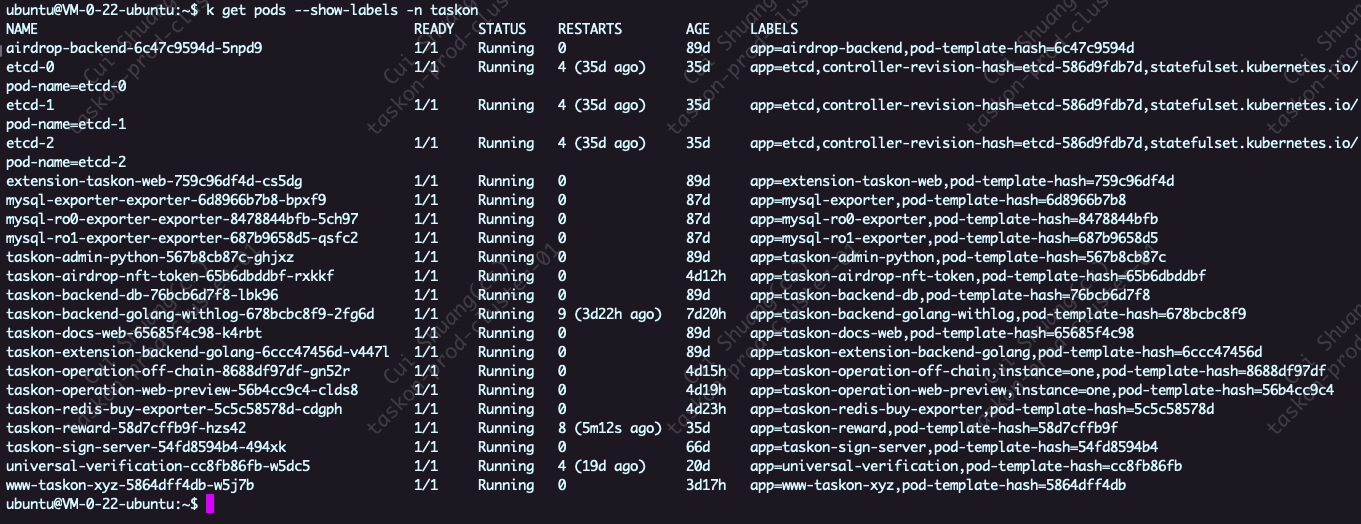
k get pods --show-labels -n taskon
k get pods –show-labels -n taskon 输出结果中,LABELS这一列有个值是app=taskon-backend-golang-withlog,pod-template-hash=678bcbc8f9。后面的pod-template-hash=678bcbc8f9这是什么?
在 Kubernetes 中,pod-template-hash 是由控制器(如 Deployment、ReplicaSet 等)自动生成的标签,用于标识 Pod 模板的特定版本。每当 Pod 模板发生更改时,控制器会创建一个新的副本集(ReplicaSet),并分配一个新的 pod-template-hash 标签值给该副本集中的 Pod。
pod-template-hash 标签的值是根据 Pod 模板的内容计算而来的哈希值,用于确保唯一性。通过将 pod-template-hash 标签添加到 Pod 上,可以确保在 Pod 模板更改时,新的 Pod 副本将被创建,而旧的 Pod 副本将被逐渐停止和删除。
在您提供的输出结果中,LABELS 列包含了两个标签:app=taskon-backend-golang-withlog 和 pod-template-hash=678bcbc8f9。其中,app=taskon-backend-golang-withlog 是您为 Pod 设置的自定义标签,而 pod-template-hash=678bcbc8f9 是由控制器自动生成的用于标识 Pod 模板版本的标签。
通过使用 pod-template-hash 标签,控制器可以跟踪和管理 Pod 模板的变更,并确保在需要更新或回滚时正确地创建、删除和管理 Pod 的副本。